Codec vs Container Explained: MP4 vs MKV, H.264 vs H.265 vs AV1
A container such as MP4, MKV or MOV is the box: a file format that bundles video, audio and subtitle tracks with timing and metadata. A codec such as H.264, H.265 (HEVC) or AV1 is the method that compresses the picture or sound inside that box. So "MP4 vs H.264" is not a choice between rivals, because a typical .mp4 file contains H.264 video. When a file refuses to play, the player can usually open the box but has no decoder for the codec inside.
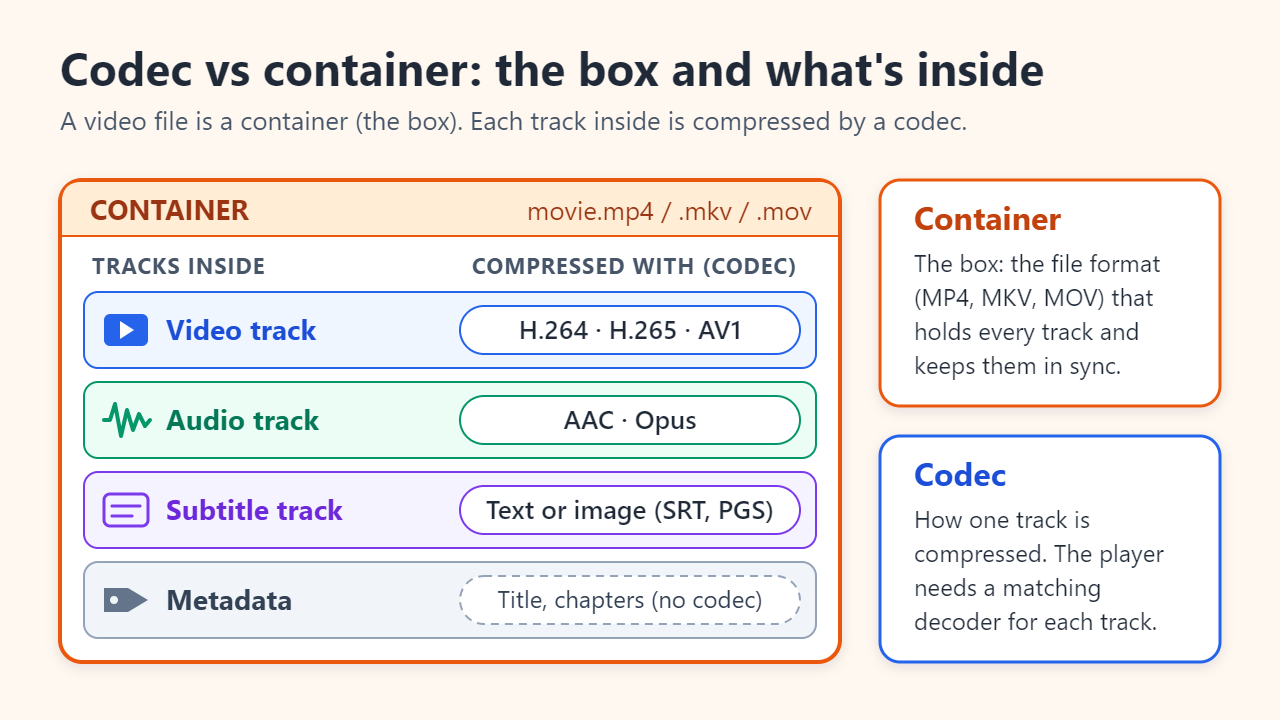
Container vs codec: the box and what is packed inside
Think of a parcel holding sealed packets. The container defines the parcel: how tracks are stored, kept in sync and labelled. Each packet was compressed by a codec (short for coder-decoder), and the player needs the matching decoder to open it. A typical video file holds:
- Video track: usually one, compressed with H.264, H.265, VP9 or AV1.
- Audio tracks: one or more, for example AAC or Opus; a movie may carry several languages.
- Subtitle tracks: text or image-based subtitles that can be switched on and off.
- Metadata: title, duration, chapters, rotation and sync timing.
The file extension names only the box. MP4 is MPEG-4 Part 14 (ISO/IEC 14496-14), a descendant of Apple's QuickTime format, which lives on as .mov. MKV is Matroska, an open container published as IETF RFC 9559 in 2024; WebM is a web-oriented version of Matroska.
MP4 vs MKV vs MOV: what changes and what doesn't
The codec decides picture quality, so the same H.264 stream looks identical whether it sits in an MP4 or an MKV file. What differs is what the box can hold and which devices will open it.
- MP4: the most widely supported container. Browsers, phones, TVs, editing apps and upload sites accept it, typically with H.264, H.265 or AV1 video and AAC audio. Subtitle options are limited to a few text formats.
- MKV: takes almost any codec, plus many audio and subtitle tracks (including styled ASS and image-based PGS subtitles), chapters and attachments such as fonts. It suits archives and home media servers, but support in browsers, phones and editors is patchy.
- MOV: Apple's QuickTime container, used for iPhone videos and professional editing. It is a close relative of MP4; the codec inside still decides what plays.
H.264 vs H.265 vs AV1: how the codecs compare
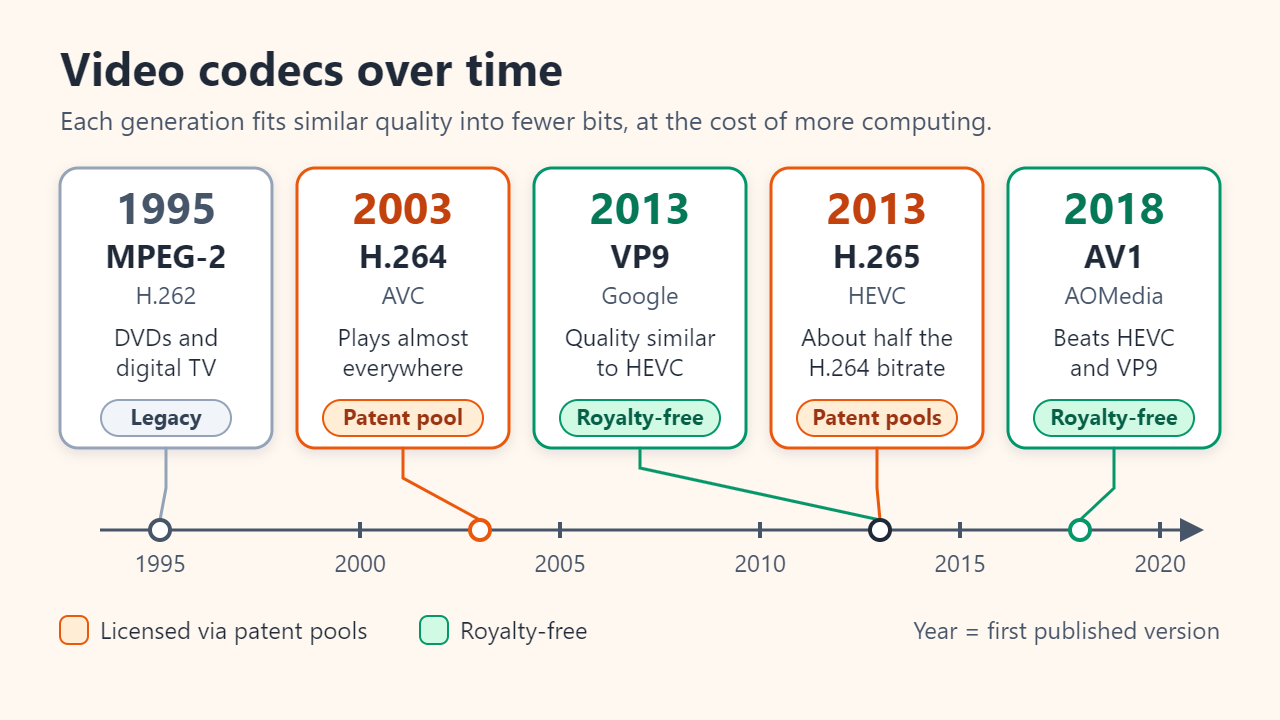
Each codec generation fits the same picture into fewer bits by doing more computation. MPEG-2 video (ITU-T H.262, 1995) powered DVDs and early digital TV. H.264, also called AVC, was first published by the ITU in 2003 and remains the safe default. H.265 (HEVC) followed in 2013, and the ITU announced it as needing only half the bit rate of H.264. AV1, released by the Alliance for Open Media in 2018, is royalty-free and, according to MDN, compresses better than both HEVC and Google's VP9.
| Codec | First published | Bitrate vs H.264 at similar quality | Playback support | Licensing |
|---|---|---|---|---|
| H.264 (AVC) | 2003, ITU-T and ISO/IEC | Baseline | Almost every browser, phone, TV and PC | Patent pool (Via LA) |
| H.265 (HEVC) | 2013, ITU-T and ISO/IEC | About half (ITU's headline figure) | Apple devices, UHD Blu-ray, many 4K TVs; browsers and Windows depend on hardware or add-ons | Several patent pools |
| VP9 | 2013, Google | Similar to HEVC | Most web browsers | Royalty-free |
| AV1 | 2018, Alliance for Open Media | Up to about half | Current browsers; on Apple, only devices with an AV1 hardware decoder | Royalty-free |
Treat "half" as a headline figure: real savings vary with content, resolution and encoder settings, and tend to be largest on high-resolution video. Newer codecs also need more processing to encode, and smooth playback on phones and laptops usually needs a hardware decoder.
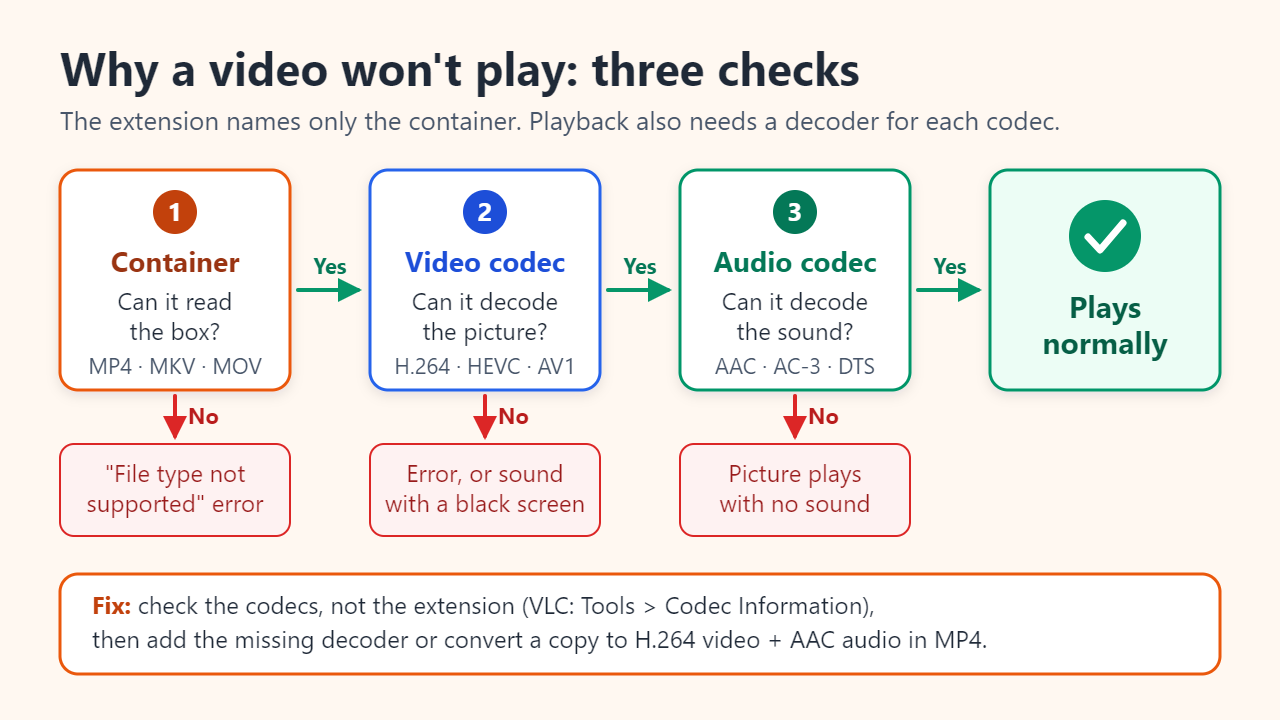
Why a video won't play even though it is an MP4
A player checks three things in order: can it read the container, does it have a decoder for the video codec, and does it have one for the audio codec. Failing the second or third check explains the classic symptoms: an error on a normal-looking .mp4, sound over a black screen, or a picture with no sound.
Common real-world cases:
- iPhone video on a Windows PC. With Settings > Camera > Formats set to High Efficiency, iPhones record HEVC. Windows' built-in apps need the HEVC Video Extensions (preinstalled on some PCs, otherwise from the Microsoft Store). Choosing Most Compatible records H.264 instead, and Apple notes that AirDrop, Messages or email may send H.264 automatically when the receiving device can't handle HEVC.
- AV1 on older Apple devices. Safari plays AV1 only where there is a hardware decoder, such as M3 Macs and later, iPhone 15 Pro and iPhone 16 and later.
- MKV files ripped from discs. The video may be fine while a surround-sound audio track uses a format the TV or phone can't decode, so playback is silent.
To diagnose a stubborn file:
- Check the codecs, not the extension: in VLC open Tools > Codec Information, or use MediaInfo or ffprobe.
- Try VLC, which ships with its own decoders. If the file plays there, it is intact and the original player lacks a codec.
- Add the missing decoder, or convert a copy; H.264 with AAC audio in MP4 is the safest target.
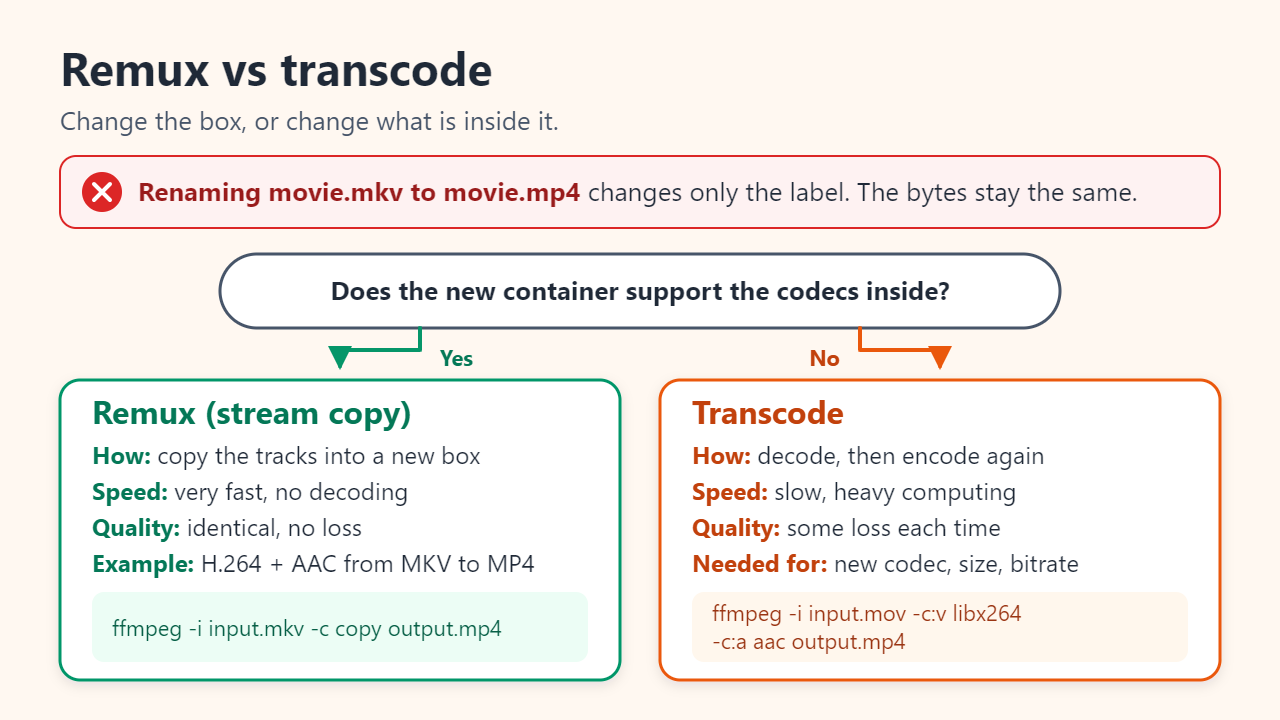
Renaming .mkv to .mp4 doesn't convert it: remux vs transcode
Changing the extension only changes the label; the bytes inside stay the same. To change the box, remux. To change what is inside the box, transcode.
- Remux (stream copy) moves the compressed tracks into a new container without decoding them. FFmpeg's documentation notes that skipping decoding and encoding makes this very fast and lossless. Example:
ffmpeg -i input.mkv -c copy output.mp4. It works only when the new container supports every track: H.264 video and AAC audio move from MKV to MP4 easily, but ASS or PGS subtitles must be dropped or converted. - Transcode decodes every frame and encodes it again, which is the only way to change the codec, resolution or bitrate. It is slow, and with lossy codecs each new generation discards a little more detail. Example:
ffmpeg -i input.mov -c:v libx264 -c:a aac output.mp4.
Export settings: sharing vs archiving
Pick the codec for the people who will watch, and the container for what the file has to carry.
| Goal | Container | Video codec | Audio | Why |
|---|---|---|---|---|
| Share with anyone (chat apps, email, older PCs, TVs) | MP4 | H.264 | AAC | Plays almost everywhere; files are larger |
| Your own phone or 4K library | MP4 or MOV | H.265 | AAC | Similar quality in less space; keep an H.264 copy for others |
| Video on a website | MP4 or WebM | AV1 with an H.264 fallback | AAC (MP4) or Opus (WebM) | Smallest files where AV1 decoding exists |
| Archive or master copy | Original file, or MKV | Keep the original | Keep the original | Remux, don't re-encode; MKV holds many tracks |
Whatever you pick, keep the original file and export from it instead of re-encoding compressed copies again and again.
FAQ
Is MKV better quality than MP4?
No. The same H.264 or HEVC stream looks identical in MKV and MP4; MKV simply holds more kinds of tracks, while MP4 plays on more devices.
Are H.265 and HEVC the same thing?
Yes. ITU-T H.265 and ISO/IEC 23008-2 (MPEG-H Part 2) are the same standard, High Efficiency Video Coding. Likewise H.264 is AVC, also published as MPEG-4 Part 10. Don't confuse that with MP4, which is MPEG-4 Part 14: the container, not the codec.
Should I convert my H.264 videos to H.265 to save space?
Only if storage matters more than time and a small quality loss. Transcoding never improves quality, takes a long time for a large library, and older devices may not play the results. Keep the originals until you have checked the copies.
Sources: ITU press release: H.265/HEVC video coding standard (2013); MDN Web Docs: Web video codec guide; FFmpeg documentation: stream copy and transcoding; Apple Support: Using HEIF or HEVC media on Apple devices
Related reading
Original illustrations created to help explain this article.