Python List vs Tuple vs Dict vs Set: Differences and When to Use Each
A Python list is an ordered collection you can change, a tuple is an ordered collection you cannot change, a dict maps unique keys to values, and a set holds unique items in no particular order. Use a list for a sequence you add to, sort or index; a tuple for a fixed record such as a coordinate; a dict to look things up by name or ID; and a set to drop duplicates or ask “is this in here?” That last question is where speed differs most: sets and dicts answer x in ... in roughly constant time on average, while lists and tuples check item by item.
![Four cards comparing Python collections: a list [5, 2, 5, 9] with index positions 0 to 3, a locked tuple (3, 4), a dict mapping "apple" to 3 and "pear" to 5, and a set {5, 2, 9} drawn as unordered bubbles, each with its order, mutability and duplicate rules.](/api/image/ef1b493a-e80c-4963-8b15-0c707b6924f8)
The syntax side by side, and two traps
All four have a literal syntax, and that is where beginners usually trip first:
scores = [90, 75, 90]             # list: square brackets
point  = (3, 4)                   # tuple: parentheses (really, the comma)
stock  = {"apple": 3, "pear": 5}  # dict: braces with key: value pairs
tags   = {"red", "green"}         # set: braces with bare items

empty_dict = {}       # {} is an empty dict, not a set
empty_set  = set()    # the only way to write an empty set
one_tuple  = (42,)    # (42) is just the number 42
Trap one: {} creates an empty dictionary, so an empty set must be written set(). Trap two: the comma, not the parentheses, makes a tuple. (42) is an integer in brackets, while (42,) or even 42, is a one-item tuple. Empty lists and tuples are simply [] and ().
Comparison table: mutability, order, duplicates, hashing
| Property | list | tuple | dict | set |
|---|---|---|---|---|
| Change in place? | Yes | No | Yes | Yes |
| Ordered? | Yes, by position | Yes, by position | Yes, insertion order | No |
| Duplicates? | Allowed | Allowed | Keys unique; values may repeat | Not allowed |
| Access by | Index: a[0] | Index: t[0] | Key: d["apple"] | No indexing; use in or a loop |
| Hashable (usable as a key)? | No | Yes, if all items are | No | No (frozenset is) |
x in c, average | O(n) | O(n) | O(1) | O(1) |
Two rows need a note. “Ordered” for a dict means it remembers insertion order, which has been a language guarantee since Python 3.7 (CPython 3.6 already did it as an implementation detail); it does not mean sorted. A set has no order at all, so it cannot be indexed, and the order you see when you print one is not something to rely on. “Hashable” decides what can be a dict key or a set member: the object needs a hash value that never changes, which rules out lists, dicts and sets. A tuple qualifies only if everything inside it is hashable, so (1, 2) works as a key but ([1], 2) does not.
How to choose: three questions and a default
The right choice depends on how you will read the data back. Ask these questions in order:
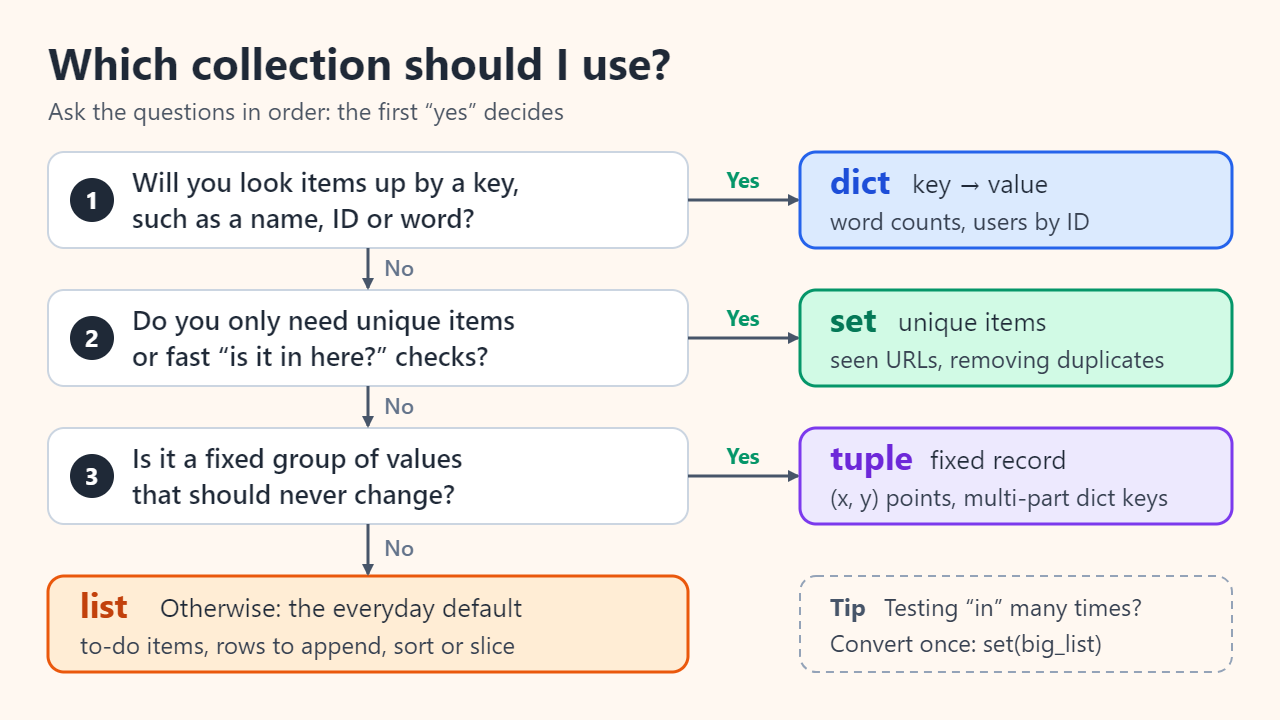
- Will you look items up by a key such as a username, product code or word? Use a dict:
prices["apple"]is clearer and faster than searching a list of pairs. - Do you only care whether something is present, or need each item once? Use a set: visited URLs, banned words, unique tags.
- Is it a fixed group of values that belong together, like an (x, y) point, an RGB color or several values returned from a function? Use a tuple. It signals “this won't change” and can serve as a multi-part dict key, as in
distance[("Seoul", "Busan")]. - Otherwise, use a list: an ordered sequence you append to, sort, slice or index by position.
Converting between them
list(t)andtuple(lst)copy items into the other sequence type, keeping their order.set(lst)removes duplicates but throws the order away.list(dict.fromkeys(lst))removes duplicates and keeps first-seen order, because dicts preserve insertion order:["b", "a", "b"]becomes["b", "a"].dict(zip(keys, values))pairs two lists into a dict;list(d)gives the keys back in insertion order, andlist(d.items())gives (key, value) tuples.sorted(s)turns a set, or any collection, into a new sorted list.
Why “in” is fast for sets and dicts but slow for lists
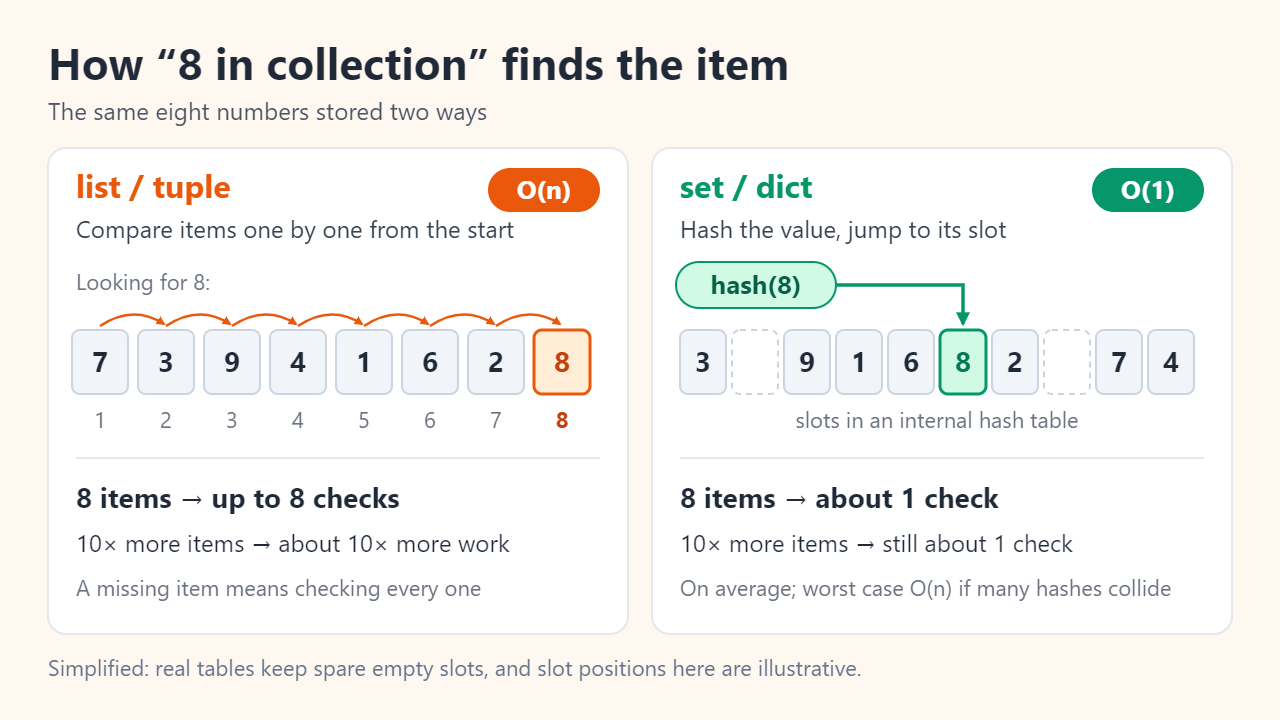
To answer x in my_list, Python compares x with each element from the start until it finds a match. If x is missing or near the end, that is n comparisons for n items, which is why the Python wiki lists the operation as O(n); a tuple works the same way. A set or dict instead computes hash(x), uses it to jump to a slot in an internal table, and checks only what is there. The wiki gives O(1) on average for both, with an O(n) worst case that appears only when many hashes collide.
The gap grows with size. In one illustrative run (CPython 3.12 on a Windows laptop, searching for a number that was not in the collection, best of seven repeats), a list took about 6.5 µs at 1,000 items, 70 µs at 10,000, 0.7 ms at 100,000 and 7.5 ms at 1,000,000. The set took about 35 ns at every size, so at a million items it was roughly 200,000 times faster. Your numbers will differ, but the pattern will not: ten times more items means about ten times longer for the list and no change for the set.
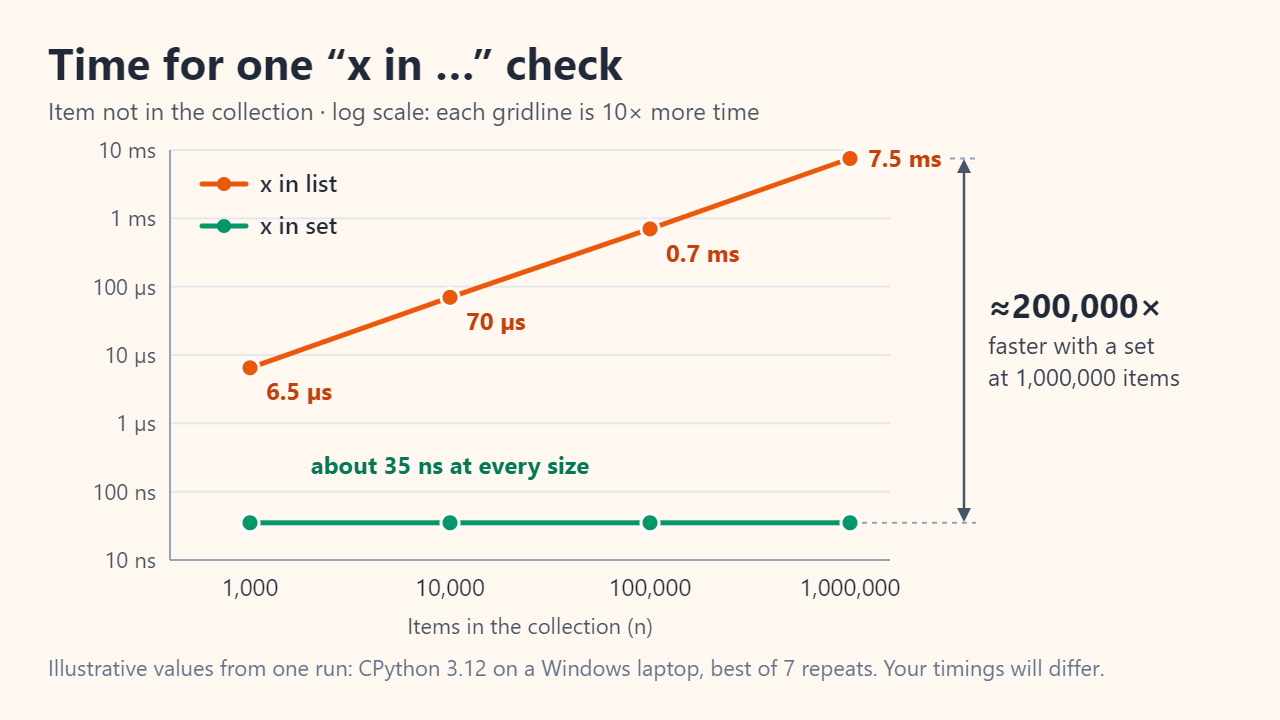
The practical rule: if you test membership many times, convert once with allowed = set(big_list) and test against the set. Building the set costs one pass over the data, so it pays off for repeated checks, not for a single lookup.
Common mistakes to avoid
- Writing
{}for an empty set. You get a dict, and calling.add()on it raises an AttributeError. - Forgetting the comma in a one-item tuple.
("admin")is just a string, so looping over it yields single letters. - Using a list as a dict key or set item. Python raises
TypeError: unhashable type: 'list'. Convert it withtuple()first. - Changing a collection while looping over it. Removing items from a list inside
for x in numsskips elements: deleting every 2 from[1, 2, 2, 3]this way leaves[1, 2, 3]. Adding or deleting dict keys mid-loop raises a RuntimeError (“dictionary changed size during iteration”), and sets behave the same way. Build a new collection instead, such as[x for x in nums if x != 2], or loop over a copy likelist(d). - Assuming a tuple's contents can never change. The tuple is fixed, but a list stored inside it can still be modified, and such a tuple cannot be hashed.
- Searching a big list inside a loop. A check like
if user in banned_listrun thousands of times is a classic hidden slowdown; a set fixes it.
FAQ
Is a tuple faster than a list?
It is slightly lighter, but rarely enough to matter. On 64-bit CPython 3.12, sys.getsizeof((1, 2, 3)) reports 64 bytes versus 88 for [1, 2, 3]. Choose a tuple because the data should not change, not for speed.
Are Python dictionaries ordered?
Yes. Since Python 3.7, dicts are guaranteed to keep insertion order, so looping over one gives keys in the order they were added. Sets make no such promise.
Can a dict have duplicate keys?
No. Assigning to an existing key replaces its value, so {"a": 1, "a": 2} evaluates to {"a": 2}. Values can repeat freely.
Sources: Python Tutorial: Data Structures; Python Docs: Built-in Types; Python Wiki: TimeComplexity; Python Glossary (hashable, immutable).
Related reading
Original illustrations created to help explain this article.