Differences between JSON and CSV: Format suitable for tables and nested data
This article was translated from its source language with AI assistance. Please check technical terms and equations against the original.
When exporting files, you frequently encounter a screen prompting you to choose between CSV and JSON. If you simply understand that CSV can be opened in Excel and JSON is a format used by developers, you might miss the reason why order items disappear or the leading zero in member numbers is removed after export. The selection criteria depend on who will open the file as well as the structure of the data. This article uses a small sample of order data for illustrative purposes and covers the process from format selection to verification after conversion.
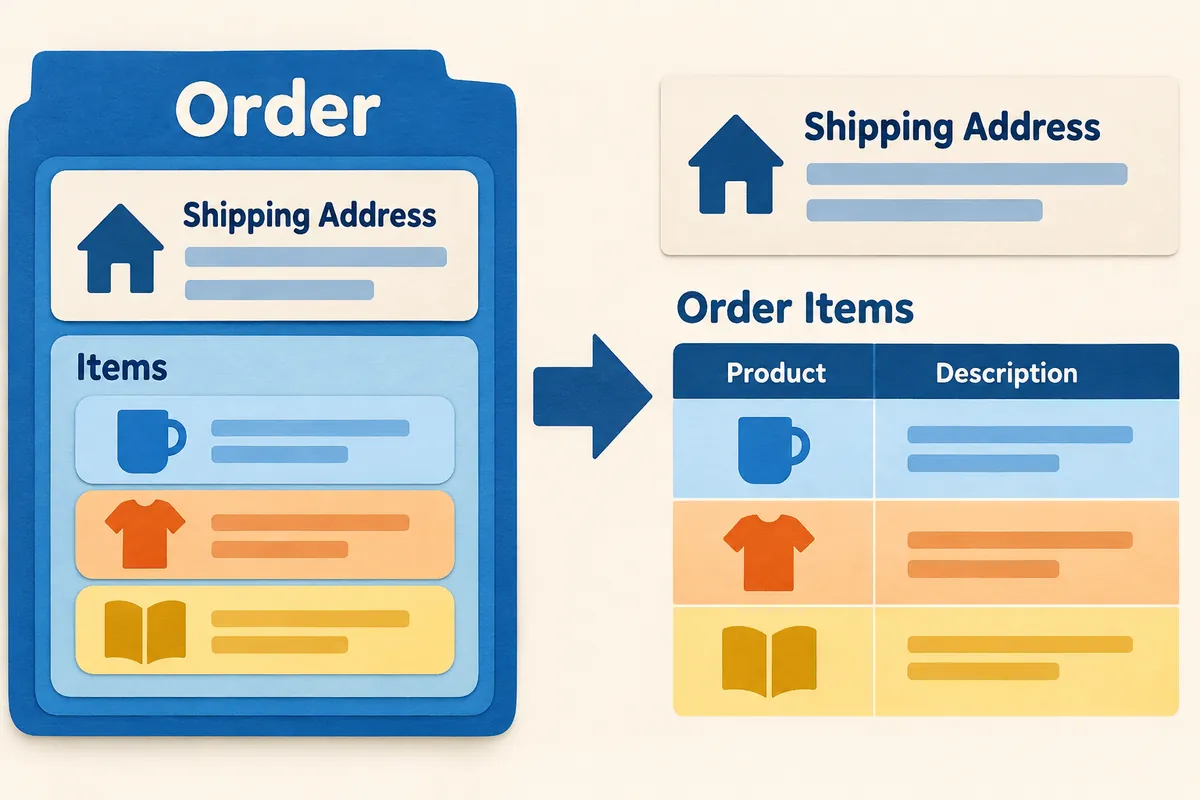
1. First, examine the difference between a single row of a table and a nested structure.
CSV is suitable for representing table-like structures consisting of rows and fields. For example, if a row represents a member and the columns are Member Number, Name, and Sign-up Date, the structure is simple. On the other hand, if an order contains a shipping address object and multiple product items, the relationships can be expressed using JSON objects and arrays. A JSON object is a collection of names and values, while an array is an ordered list of values. It is recommended not to treat the order of an array as the same as the display order of object items.
JSON includes strings, numbers, true/false values, null, objects, and arrays. The entire document does not necessarily have to start with curly braces. A single value or an array can constitute a JSON document, but you must separately verify whether the program actually reading it accepts only specific structures. The syntax allowed by the format itself differs from the input specifications required by a specific service. Upload compatibility is not guaranteed merely because the file extension matches.
| Comparison Question | CSV | JSON |
| Basic Structure | Row and field-centered table | Expressing nesting relationships with objects and arrays |
| Types of values | Interpret with reading tools and separate rules | Distinguishing between strings, numbers, booleans, nulls, etc. |
| Order with multiple products | Expand items into rows or separate into a table | Represented as an array of items within an order |
| When a person reviews | Convenient row and column comparison in the table editing tool | Easy to check hierarchy and value types |
| Contents that must be agreed upon | Separator · Encoding · Empty Value · Column Meaning | Field meaning · Required values · Handling duplicate names |
2. Express the same spell in two forms.
The data below is an illustrative example, not actual customer information. The order number is written as a string because it is an identifier that requires character preservation rather than a numerical value. Since there are two products, there are two objects in the item array. Amounts and payment information have not been included. Reducing items that are not necessary for checking format differences makes it easier to read which information was lost during the conversion process.
{
  "order_id": "0012",
  "customer": "김예시",
  "items": [
    {"sku": "A01", "quantity": 2},
    {"sku": "B02", "quantity": 1}
  ],
  "memo": null
}
If you expand this structure into a single CSV, you can create a separate row for each product item. Although the order number and customer name are repeated, this repetition does not necessarily imply duplicate orders. This is the result of changing the meaning of a row from 'order' to 'product items within an order'. If you use the row count directly when counting orders, one order will be counted as two. You must first determine what counts as a single item before and after the conversion.
order_id,customer,sku,quantity
0012,김예시,A01,2
0012,김예시,B02,1
The CSV example above omits the memo to illustrate the item structure, so it is not the result of converting the entire JSON without loss. To retain both order-level memos and product-level information, you can separate the order table and the product item table. The order table contains the order number once, while the item table contains the same order number multiple times. The key connecting the two tables is the order number. This is a design example proposed in this article and does not imply that CSV automatically manages the relationships. If you provide two files, you must also explain the connection rules and how to handle missing keys.
3. Accurately handle commas and quotation marks in CSV
RFC 4180is an informational document explaining widely used CSV representations. There is no guarantee that all tools will read it according to exactly the same rules. In the method described in the document, fields containing commas, line breaks, or double quotes are enclosed in double quotes, and double quotes within fields are written twice. If you do not know this rule and simply separate strings with commas, a single memo may be split into two columns.
id,memo
01,"회의, 자료 확인"
02,"그는 ""확인""이라고 적었다"
The comma within the first memo is the memo content, not a column separator. The consecutive double quotes in the second memo represent a single double quote of the content when read. Since line breaks can be included within quoted fields, the physical number of lines in the text file is not always equal to the number of data records. Count records using the CSV-only read function, and use simple line counting as a secondary check.
Although files with semicolons or tabs as delimiters are transmitted as tabular data, you must match the actual delimiters on the receiving program's selection screen. If all content is contiguous in the first column, it may not be that there is no data, but rather that the delimiter interpretation is incorrect. If the number of columns suddenly increases, check the citation processing or the commas in the content. Copying and preserving the original file before manually deleting commas makes recovery easier.
4. Do not convert identifiers that look like numbers into numbers.
0012 is a four-digit identifier in the order number example. If a table program estimates this as the number 12, the leading zeros may be removed during display or export. In JSON examples, you can distinguish the type by writing it as a string like "0012", but in CSV, you must pass import settings or separate column specifications to read the column as text. Do not assume that double quotes in CSV alone can prevent number estimation by all programs.
The same judgment is required for phone numbers, zip codes, and product codes. Distinguish whether the value is to be added or averaged, or if it is an identifier whose format must be preserved. If a code that looks like a date is automatically converted to a date, designate the column as text and compare it with the original value. If leading zeros have already disappeared, you must know the original or the length rules to recover them. If zeros are arbitrarily appended, it becomes difficult to distinguish them from codes of different original lengths.
5. Distinguishes empty strings, null, and missing fields.
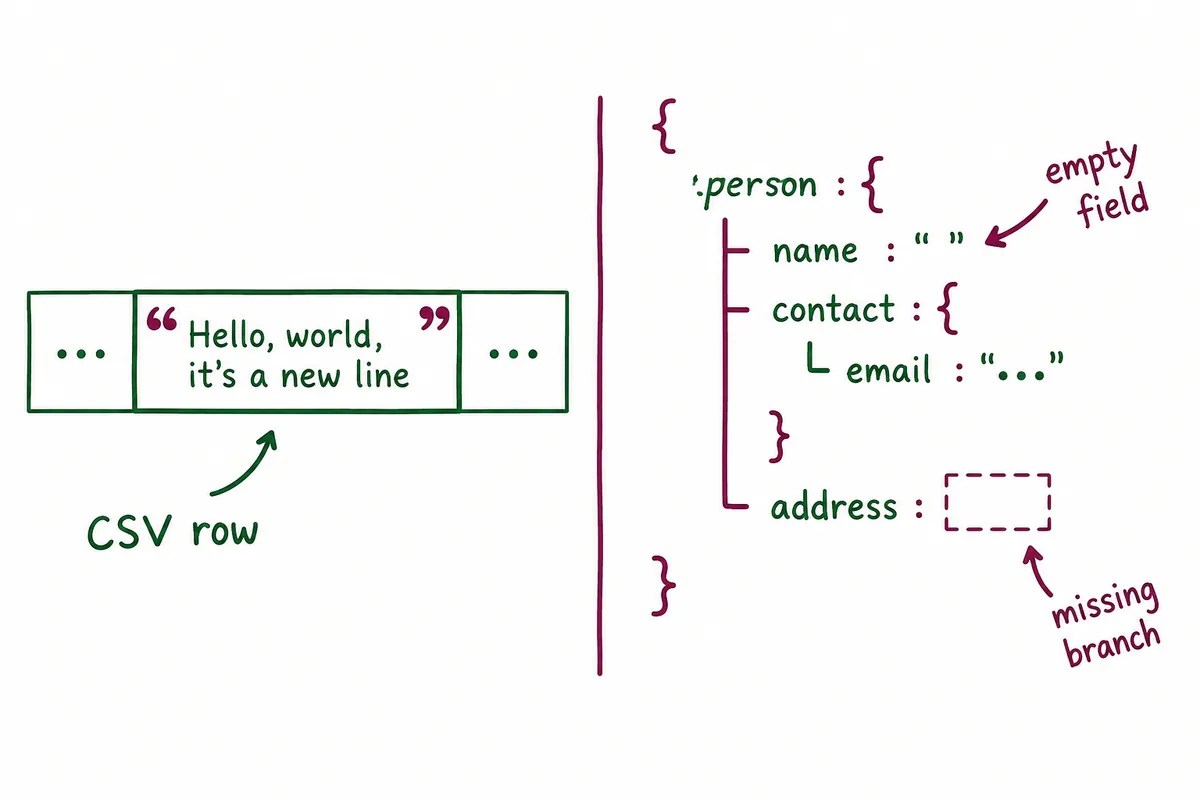
In JSON, "memo": "" indicates an empty string value, and "memo": null indicates a value of null. If the object does not contain a memo item at all, it is a different state. While these three states can be used interchangeably in business, the format does not automatically assign them the same meaning. If you wish to differentiate between 'no content', 'not collected yet', and 'item not supported', you must specify input rules.
When converting CSV blanks to JSON, if you set everything to null, the intended value may not be distinguishable from the original empty string. Conversely, if you replace JSON null with the character "null", the value type changes. Create a table for handling empty values for each column before conversion. For example, treat blank spaces in the memo as empty strings, unspecified quantities as errors, and unselected shipping dates as null. This rule must be agreed upon by both the data creator and the reader.
6. Find JSON errors by separating syntax and structure
In standard JSON syntax, double quotes are used for attribute names and strings, and a comma is not added after the last item. Referring to commented configuration files or object representations from other languages that use single quotes as JSON can lead to read errors. First, check for parentheses, quotation marks, and commas using a syntax checker, and then verify required fields and value types. Even if the syntax is correct, data with negative quantities or missing order numbers may not meet business specifications.
Avoid repeating the same name for objects.RFC 8259recommends using unique names, and implementations for handling duplicate names may vary. It is difficult to trust the conversion results if you rely on which value a tool retains when reading data where 'quantity' appears twice. Consider arrays or separate item structures for multiple values of the same type rather than forcing different names.
7. Check the encoding and conversion results step by step.
Using UTF-8 is important for interoperable JSON exchanges. For CSV files, you must also check the encoding interpretation of the tool opening the file. If Korean characters appear broken, check the original encoding on the import screen rather than re-entering the data. JSON syntax errors and broken characters can be different issues. Conversion is performed based on the original data that was read correctly, comparing not only human-readable names but also the characters of identifiers.
If the explanatory order is spread across two rows in the CSV, the validation values are 'Number of unique order numbers 1, Number of items 2, Total quantity 3'. When bundling back into JSON, check if there are two items. Judging success based solely on matching row counts can miss errors where one item is duplicated into another. Comparing the set of item codes, identifiers, totals, and empty value status together makes it easier to find information lost during the conversion.
When submitting files, include column or field descriptions along with small examples. You can start by writing down the item name, meaning, type of value, empty value rules, and the meaning of a row. These descriptions must be preserved even if the data format is changed. If you define the meanings to be preserved before choosing a CSV to JSON conversion tool, you will have a standard to review the conversion tool's automatic estimations.
8. Final checklist for selecting the format
- Have you determined what unit a row represents?
- Does a single item contain multiple sub-items?
- Did you distinguish between numbers and identifiers?
- Have you determined the meaning of empty string, null, and omission?
- Have you checked the CSV delimiter and quotation rules?
- Have you checked the Korean encoding?
- Did you compare the number of items and unique keys before and after the conversion?
- Have you checked the input specifications of the program you are actually receiving?
If simple tables are reviewed and exchanged by humans, CSV may be convenient, while JSON may be suitable for exchanges that preserve hierarchy and value types. Neither format is always superior. The practical selection criteria involve defining the relationships between the data, the tools to be used, and the transmission rules, and verifying that the same meaning remains after conversion.
Official Sources and Writing Standards
Data Verification Date: 2026-10-10. This explanation was generated by AI based on actual official data. Calculations, codes, and verification examples marked separately are for illustrative purposes only and are not the results of direct testing or actual measurements of the user environment. We will re-verify whether there have been any changes to the functions and data on the publication date.
Original illustrations created to help explain this article.
Original on Tistory ↗