DPI vs PPI Explained: How Many Pixels You Need to Print at 300 DPI
PPI (pixels per inch) describes an image or a screen: how many pixels fill one inch. DPI (dots per inch) describes a printer: how many tiny ink dots it can place in one inch. When a print shop asks for a "300 dpi" file, it almost always means 300 ppi, so the pixels you need are simply the print size in inches × 300. An A4 page (210 × 297 mm) at 300 ppi therefore needs 2480 × 3508 pixels.
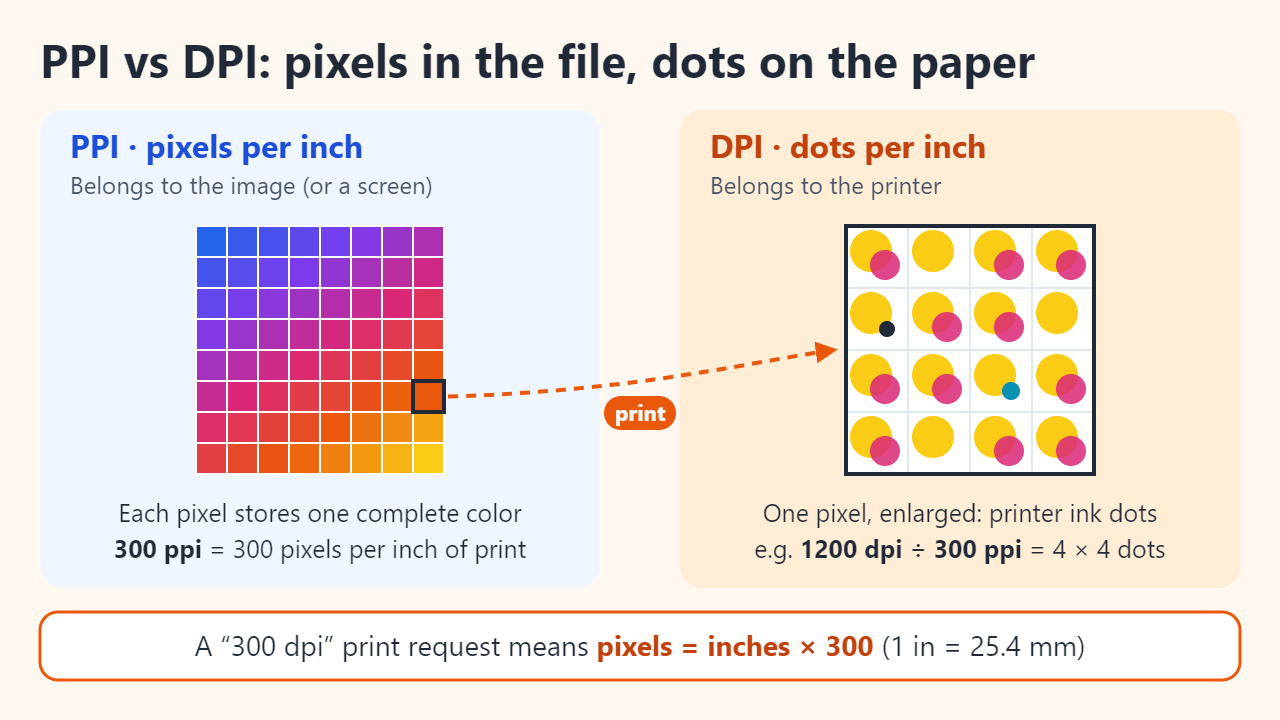
PPI vs DPI: what each number counts
A digital image is a grid of pixels, and every pixel stores one complete color. On its own, that grid has no physical size. PPI is the link: it says how many of those pixels will be spread across each inch when the image is printed. Screens have a PPI too, fixed by the panel's resolution and size.
DPI belongs to the output device. A printer cannot print a pixel's color directly; it builds that color from small dots of cyan, magenta, yellow and black ink. Adobe's Photoshop documentation notes that dpi applies only to printers, varies from model to model, and that a 600-dpi printer needs only a 150–300 ppi image for best quality. In other words, printer DPI is usually several times higher than image PPI, and the two are not supposed to match.
In everyday use the words get mixed up constantly. Here is where each one really applies:
- PPI: the Resolution field in an image editor, the resolution value stored in a file, and the pixel density of a monitor or phone.
- DPI: printer specifications and a printer's quality settings.
- "DPI" that really means PPI: print-shop file requirements ("300 dpi, please") and scanner settings, where scanning at 300 dpi records 300 pixels for every inch of the original.
The formula: pixels = inches × PPI
Since 1959 the inch has been defined as exactly 25.4 mm, so converting any print size into pixels takes three steps:
- Convert each side to inches (mm ÷ 25.4, or cm ÷ 2.54).
- Multiply by the target PPI.
- Round to whole pixels.
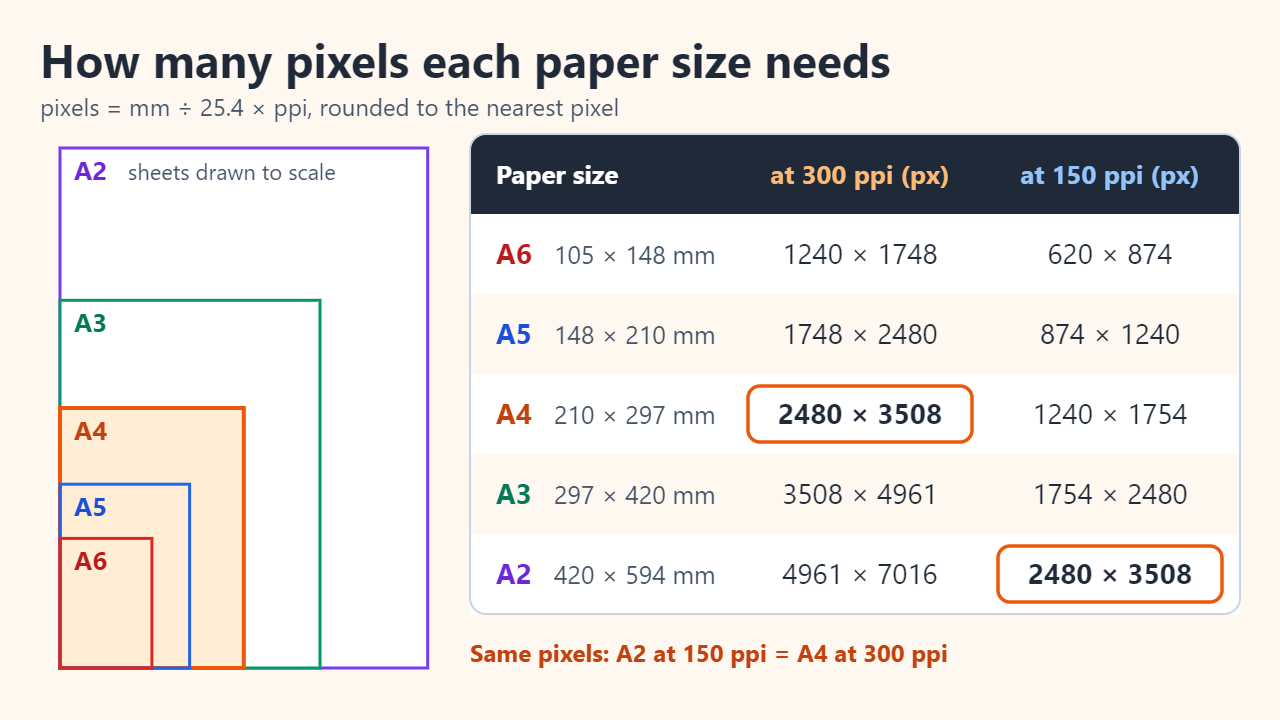
For A4: 210 mm ÷ 25.4 = 8.268 in, and 8.268 × 300 = 2480 px. The long side is 297 mm ÷ 25.4 = 11.693 in, and 11.693 × 300 = 3508 px. That is about 8.7 million pixels. The formula also runs backwards: print size = pixels ÷ PPI, and effective PPI = pixels ÷ inches. If your printer also asks for bleed (extra image that is trimmed off after printing), add it to the page size before you multiply.
| Print size | Dimensions | At 300 ppi (px) | At 150 ppi (px) |
|---|---|---|---|
| A6 | 105 × 148 mm | 1240 × 1748 | 620 × 874 |
| A5 | 148 × 210 mm | 1748 × 2480 | 874 × 1240 |
| A4 | 210 × 297 mm | 2480 × 3508 | 1240 × 1754 |
| A3 | 297 × 420 mm | 3508 × 4961 | 1754 × 2480 |
| A2 | 420 × 594 mm | 4961 × 7016 | 2480 × 3508 |
| 4 × 6 in photo | 102 × 152 mm | 1200 × 1800 | 600 × 900 |
| US Letter | 8.5 × 11 in | 2550 × 3300 | 1275 × 1650 |
| 18 × 24 in poster | 457 × 610 mm | 5400 × 7200 | 2700 × 3600 |
Notice the pattern in the A series. Each size is half of the one above it, and A2 is exactly twice A4 in both directions, so A2 at 150 ppi needs the same 2480 × 3508 pixels as A4 at 300 ppi. Halving the PPI halves each side and cuts the pixel count to a quarter.
Why changing the DPI number alone does nothing
The resolution value stored in a JPEG or PNG is only a label that suggests a print size. A 3000 × 2000 pixel photo tagged 72 ppi and the same photo tagged 300 ppi contain identical pixels. At 300 ppi the file prints at 10 × 6.67 in (25.4 × 16.9 cm); at 150 ppi it prints at 20 × 13.33 in (50.8 × 33.9 cm), with every pixel twice as wide.
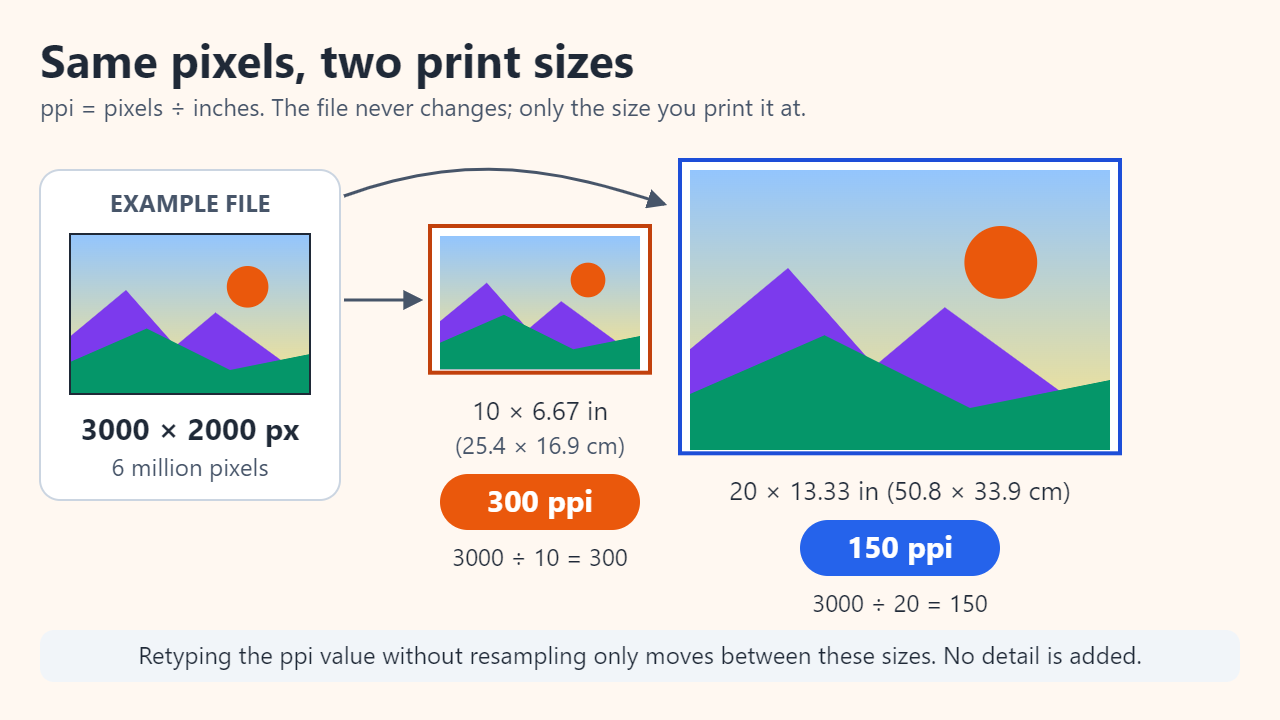
Image editors make this explicit. In Photoshop's Image > Image Size dialog, turning off Resample locks the pixel dimensions, so typing a new resolution simply changes the print size, and vice versa. Turning Resample on changes the pixel count: downsampling discards pixels, while upsampling makes the software guess new ones, which Adobe warns can degrade quality. Neither path recovers detail that was never captured.
Common mistakes to avoid:
- Retyping 72 as 300 with resampling on, which makes the file bigger but not sharper.
- Cropping a small part of a photo and printing it at full page size, which quietly lowers the effective PPI.
- Judging a file by its dpi tag instead of its pixel dimensions.
How much PPI you actually need: viewing distance
300 ppi is the usual benchmark for things held in the hand, such as photo prints, brochures and magazines. It is a convention, not a law of physics. A University of North Carolina library guide suggests 150–200 ppi for newsletters and newspapers and 250 ppi or more for magazines, and notes that going above 300 ppi may be unnecessary.
Distance matters because your eye judges the angle each pixel covers, not its size in millimeters. Step back twice as far and every pixel looks half as big, so half the PPI gives the same apparent sharpness. Scaling from 300 ppi at about 30 cm (1 ft) gives this rough guide:
- 30 cm, a print held in the hand: 300 ppi
- 60 cm, a desk calendar or a chart at arm's length: 150 ppi
- 1 m, a poster in a hallway: about 90 ppi
- 3 m, a banner across a room: about 30 ppi
These are geometric estimates, not printing standards. If a print shop states a minimum resolution, follow it.
How to calculate a screen's PPI
A screen's PPI comes from its resolution and its diagonal size. Use Pythagoras to find the diagonal in pixels, then divide by the diagonal in inches: PPI = √(width² + height²) ÷ diagonal inches.
For a 27-inch 2560 × 1440 monitor: √(2560² + 1440²) = √8,627,200 ≈ 2937 pixels, and 2937 ÷ 27 ≈ 108.8, or about 109 ppi. The same method gives about 92 ppi for a 24-inch 1920 × 1080 monitor and about 163 ppi for a 27-inch 3840 × 2160 (4K) monitor. The advertised diagonal may be rounded, so treat the result as approximate.
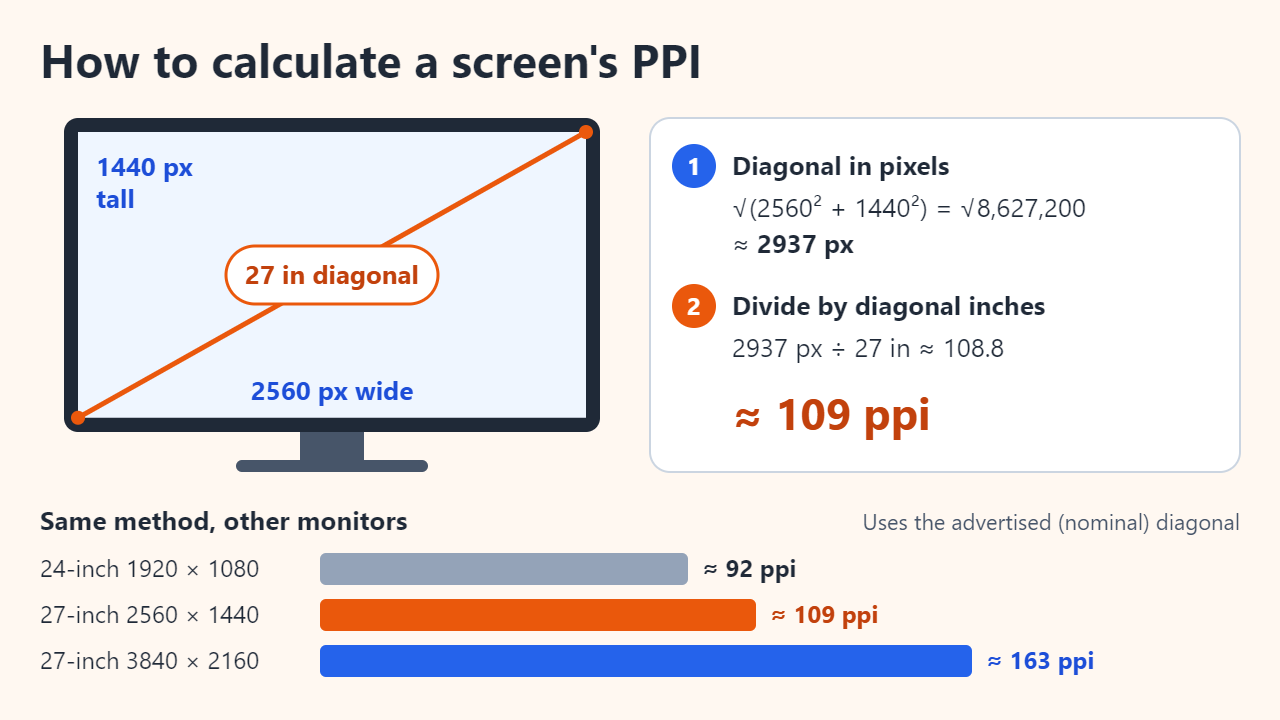
Screen PPI and print PPI are separate questions. A photo does not need to match your monitor's PPI to print well; what matters is its pixel count compared with the print size.
FAQ
My photo says 72 dpi. Is it too low to print?
Not necessarily. Check the pixel dimensions instead. A 12-megapixel photo of 4032 × 3024 pixels covers 34.1 × 25.6 cm at 300 ppi, which is larger than an A4 sheet, whatever its resolution tag says.
Does a higher printer DPI setting need a higher-resolution file?
No. Printer DPI controls how finely ink is placed. Following Adobe's example, a 600-dpi printer needs only a 150–300 ppi image, and sending far more pixels than the print size requires mostly makes the file larger.
Can I upscale a small image to 300 ppi?
You can resample it, but upsampling invents pixels by interpolation, so edges get softer rather than sharper. Whenever possible, go back to the original file, export a larger version, or use a vector version for logos and text.
Sources: Adobe Photoshop Help on image size, resolution and resampling; NIST on the definition of the inch (exactly 25.4 mm); University of Cambridge page on ISO 216 paper sizes; UNC Libraries guide to imaging concepts.
Related reading
Original illustrations created to help explain this article.