What Is an IP Address? IPv4 vs IPv6 and Public vs Private IPs
An IP address (Internet Protocol address) is the numeric address networks use to deliver data to the right device, like a postal address stamped on every packet. IPv4 addresses are 32-bit numbers written as four decimals, such as 192.168.1.23, which allows about 4.3 billion addresses; IPv6 addresses are 128-bit numbers written in hexadecimal, such as 2001:db8::1, which allows about 3.4×1038. At home your devices usually have private addresses like 192.168.x.x that work only inside your network, while the router shares one public address with the internet through NAT.
What an IP address actually does
Data crosses the internet in small packets, and every packet carries two IP addresses: the source it came from and the destination it is headed to. Routers along the way read the destination and pass the packet one hop closer; the reply travels back to the source address. That is why every device that talks on a network needs an address.
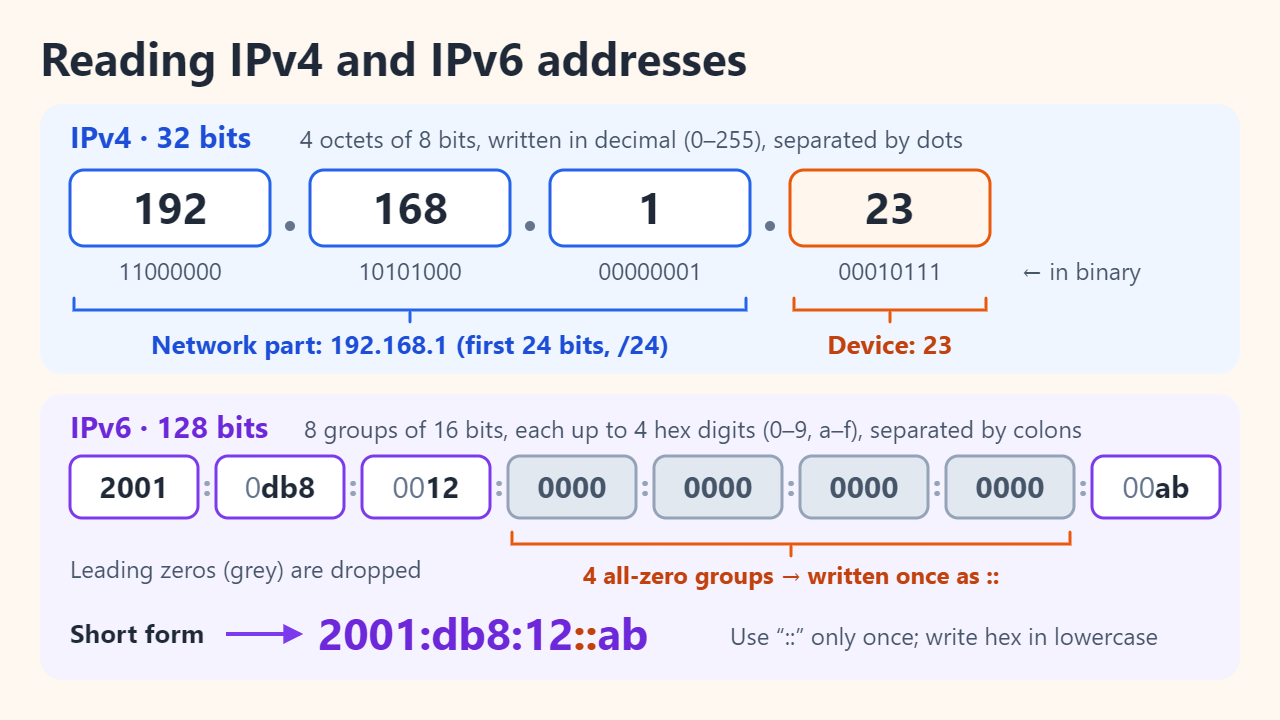
Strictly speaking, an address belongs to a network interface, not to a person or even a whole device: a laptop on Wi-Fi and Ethernet at once has two. Each address also has two parts, a network prefix shared by everything on the same local network and a host part that picks one device. In 192.168.1.23/24, the first 24 bits (192.168.1) name the network and the last 8 bits (23) name the device. The subnet mask 255.255.255.0 is another way of writing /24.
How to read IPv4 and IPv6 addresses
An IPv4 address is 32 bits split into four 8-bit octets. Each octet is written in decimal from 0 to 255, so 192.168.1.23 is 11000000 10101000 00000001 00010111 to a computer, and 192.168.1.300 is not a valid address.
An IPv6 address is 128 bits written as eight groups of 16 bits. Each group holds up to four hexadecimal digits (0–9 and a–f), and colons separate the groups. Because the full form is long, RFC 4291 and RFC 5952 define how to shorten it:
- Drop leading zeros in each group: 0db8 becomes db8, and 0000 becomes 0.
- Replace the longest run of all-zero groups with a double colon (::). It may appear only once, or the address would be ambiguous.
- Write the letters a–f in lowercase.
So 2001:0db8:0012:0000:0000:0000:0000:00ab becomes 2001:db8:12::ab. Software expands it again by refilling zero groups until there are eight.
Why IPv4 ran out and why IPv6 exists
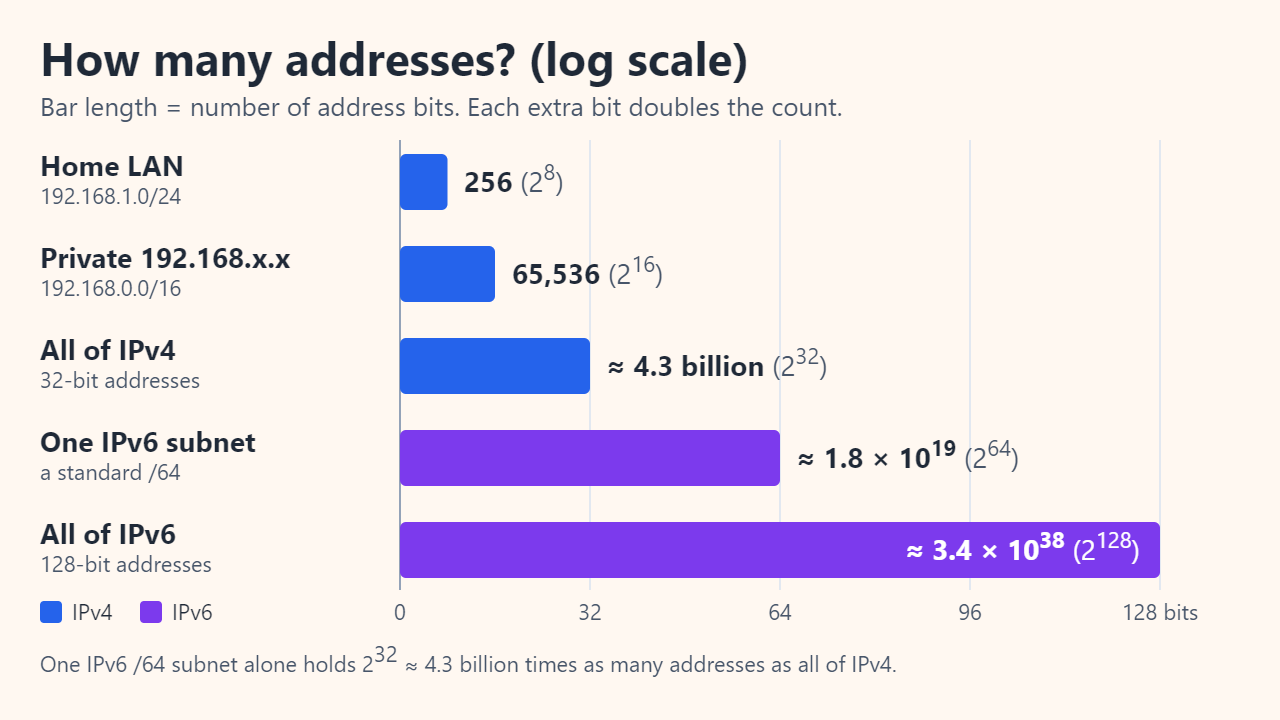
Thirty-two bits allow 232 = 4,294,967,296 combinations. That is fewer than one per person on a planet of more than 8 billion people, and large blocks are reserved for private networks, multicast and other special uses. IANA, which hands address blocks to the five Regional Internet Registries, gave each registry one final /8 block (16,777,216 addresses), and on 3 February 2011 its free pool was declared fully depleted. The registries then had to ration what was left; ARIN, which serves North America, ran out of free IPv4 space on 24 September 2015.
IPv6 solves the shortage with 128 bits: 2128 ≈ 3.4×1038 addresses. Even one standard IPv6 subnet, a /64, holds 264 ≈ 1.8×10¹⁹ addresses, about 4.3 billion times the entire IPv4 space. IPv6 cannot talk to IPv4 directly, so most networks run both side by side (dual stack), and your computer probably already has addresses of both kinds.
| Feature | IPv4 | IPv6 |
|---|---|---|
| Length | 32 bits | 128 bits |
| Written as | 4 decimal octets with dots | 8 hex groups with colons |
| Example | 192.168.1.23 | 2001:db8:12::ab |
| Total addresses | ≈ 4.3 billion (232) | ≈ 3.4×1038 (2128) |
| Loopback (“this device”) | 127.0.0.1 | ::1 |
| Local-only addresses | RFC 1918 private ranges | Link-local fe80::/10, unique local fc00::/7 |
| Coping with scarcity | NAT shares one public address | Enough for every device to have its own |
Public vs private IP addresses and NAT
A public IP address is unique on the internet and reachable from anywhere. A private address comes from ranges that RFC 1918 set aside in 1996 for use inside homes and organizations. Internet routers do not carry these ranges, so millions of households can reuse the same 192.168.1.x numbers without conflict. A few other special ranges are worth recognizing too:
| Range | Prefix | Addresses | Where you see it |
|---|---|---|---|
| 10.0.0.0 – 10.255.255.255 | 10.0.0.0/8 | 16,777,216 | Private: large offices, some routers |
| 172.16.0.0 – 172.31.255.255 | 172.16.0.0/12 | 1,048,576 | Private: business networks |
| 192.168.0.0 – 192.168.255.255 | 192.168.0.0/16 | 65,536 | Private: most home routers |
| 100.64.0.0 – 100.127.255.255 | 100.64.0.0/10 | 4,194,304 | Carrier-grade NAT inside an ISP |
| 169.254.0.0 – 169.254.255.255 | 169.254.0.0/16 | 65,536 | Self-assigned when DHCP fails |
| 127.0.0.0 – 127.255.255.255 | 127.0.0.0/8 | 16,777,216 | Loopback: the device itself |
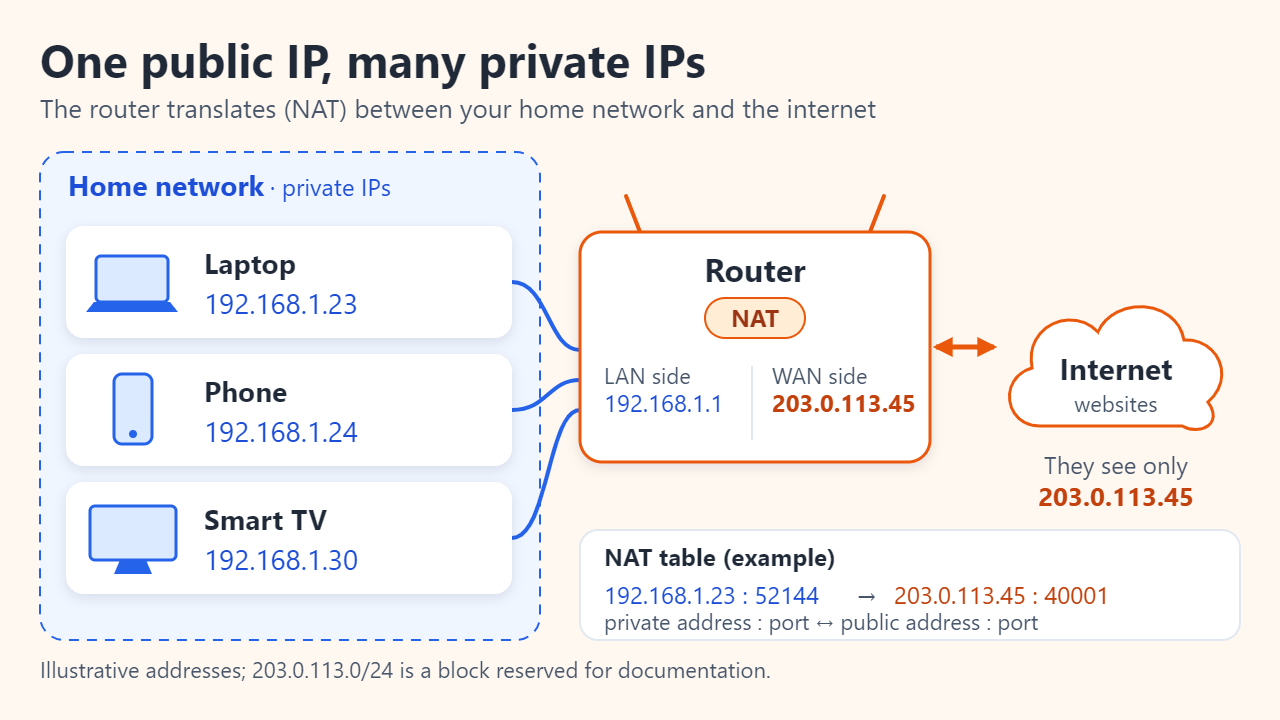
Because only the router holds a public address, it performs network address translation (NAT). When your laptop at 192.168.1.23 opens a web page, the router rewrites the packet’s source to its own public address and a port number it chooses, records the pair in a translation table and reverses the swap when the reply arrives. That lets dozens of devices share one public address. A side effect is that outsiders cannot start a connection to a device inside your network unless you set up port forwarding.
Dynamic vs static IPs, and what your IP reveals
Inside the home, the router’s DHCP server leases private addresses automatically, so a phone might get .24 this week and .31 next week. For a printer or game console that needs a fixed address, use a DHCP reservation on the router rather than typing a static address into the device. Most home internet plans also assign the public address dynamically; it may stay the same for months or change after a router restart. A static public address is usually a business or add-on service.
An IP address points to a connection, not a person. Websites see your public address and can look up your ISP and a rough location, often only a city or region and sometimes wrong. They cannot read your name or street address from it, although your ISP can match an address and time to a subscriber account. A VPN replaces the public address websites see with the VPN server’s address.
How to check your IP address
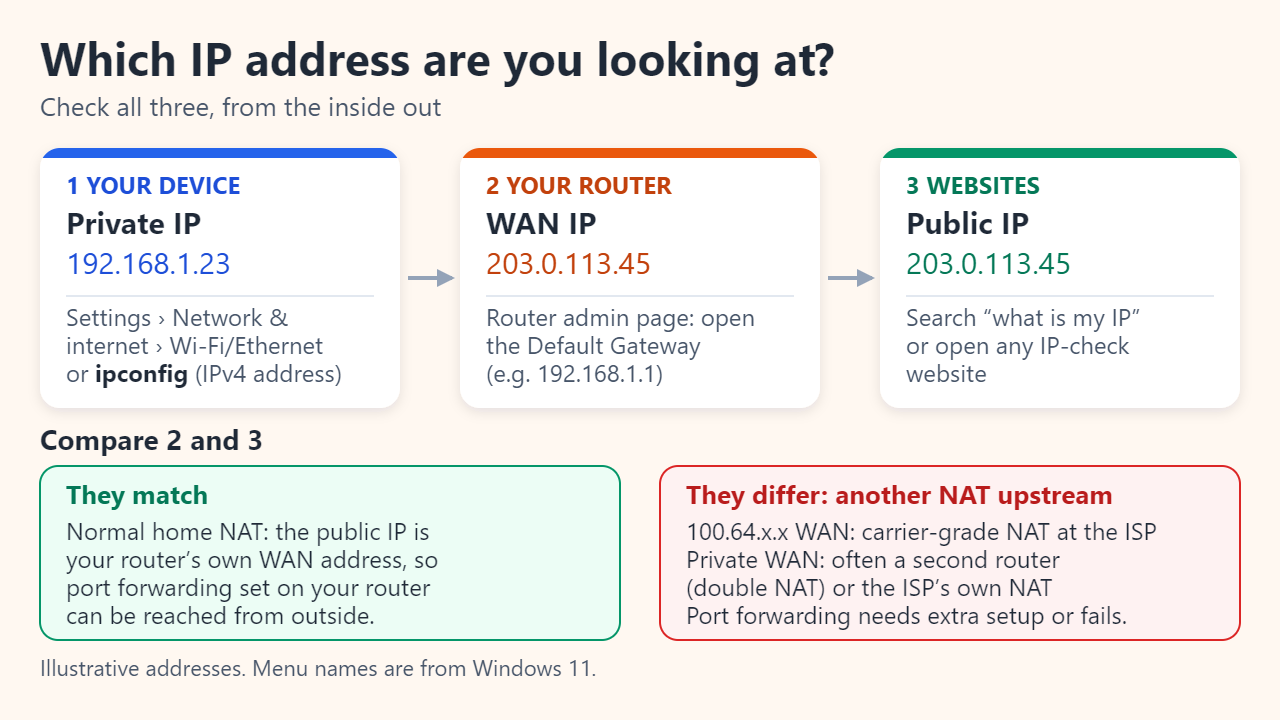
- Private IP on Windows: open Settings > Network & internet, select Wi-Fi (then your network) or Ethernet, and look for IPv4 address. Or run
ipconfigin Command Prompt to list IPv4 and IPv6 addresses, the subnet mask and the default gateway. - Private IP on a Mac: Apple menu > System Settings > Network, select the connection, click Details, then TCP/IP.
- Router: the Default Gateway in ipconfig, often 192.168.0.1 or 192.168.1.1. Open it in a browser to reach the admin page, which shows the router’s WAN (internet-side) address.
- Public IP: search “what is my IP” or open any IP-check site.
Compare the last two. If the router’s WAN address is in 100.64.0.0/10, your ISP uses carrier-grade NAT and you share a public address with other customers. If it is a private address, a second router or the ISP’s own NAT sits in front of yours. Either way, port forwarding needs extra setup or will not work.
FAQ
Why does my IP address start with 192.168?
Your router hands out addresses from the private 192.168.0.0/16 range. That is normal, and the same numbers are in use in millions of other homes. Websites never see this address, only your router’s public one.
Can two devices have the same IP address?
Devices in different homes can share a private address such as 192.168.1.10. On the same network they cannot: the addresses conflict and at least one device loses its connection. Public addresses are unique worldwide.
What does a 169.254.x.x address mean?
The device asked for an address, got no answer from a DHCP server and assigned itself a link-local one. It cannot reach the internet that way, so check the cable or Wi-Fi connection and restart the router.
Sources: IETF RFC 1918: Address Allocation for Private Internets; IETF RFC 4291: IP Version 6 Addressing Architecture; Number Resource Organization: IPv4 free pool depleted; Microsoft Support: Essential network settings and tasks in Windows.
Related reading
Original illustrations created to help explain this article.