Organizing Meeting Minutes with Claude: Comparing Decisions, Assignments, and Deadlines with the Original Text
This article was translated from its source language with AI assistance. Please check technical terms and equations against the original.
Organizing meeting minutes using Claude allows you to quickly find key points within long notes. However, if you proceed with work relying solely on natural summaries, a suggestion to "review" might turn into a decision, or an unassigned task might be recorded as someone else's responsibility. In practice, what matters more than smooth sentences is whether decisions, responsibilities, and deadlines match the original text. Using a hypothetical meeting memo as an example, this article explains how to organize and verify results in a table.
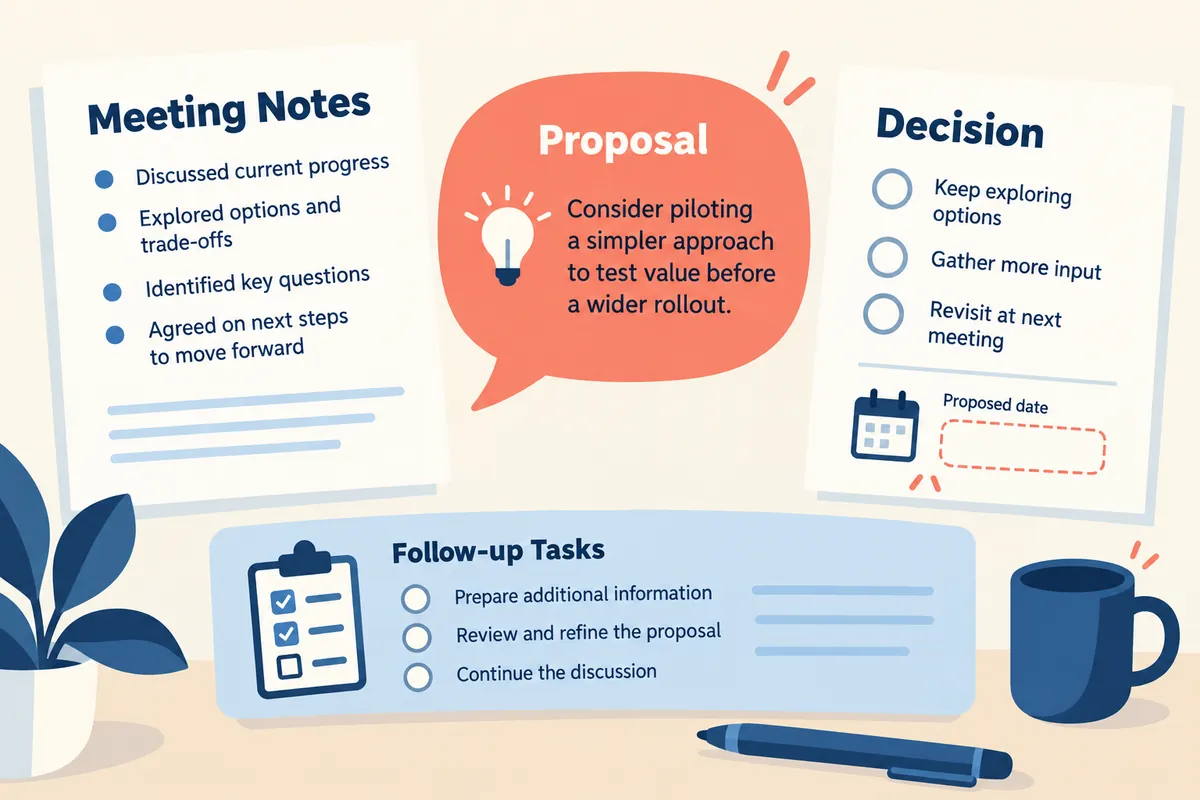
Separate the information in the original text first
The content discussed in a meeting can be categorized into reports, proposals, decisions, and follow-up actions. A statement like "Data has not yet been collected" is a status report, while "How about releasing it next week?" could be a proposal. You must also verify the meeting context to determine if a statement like "We will release it by Friday after review" is an actual agreement. Requesting AI to distinguish these four categories can reduce the problem where summaries appear to be all factual. Do not arbitrarily finalize sentences that are difficult to categorize; instead, leave them as items for verification.
Please also check the status of the original text. The errors to review differ depending on whether the notes were written manually or automatically transcribed. Automated transcriptions may contain incorrect names, numbers, or negative expressions, while short notes may omit who spoke. If the original text read by the AI is incorrect, the results may be wrong even if properly organized. It is easier to review the results if you write the meeting date, type of original text, and whether any sections are missing at the beginning of the document, and mark the parts where transcription errors are suspected.
Practice with explanatory meeting notes
The following is an explanatory memo, not an actual meeting transcript. “September 8th Information Page Review Meeting. Jisoo: The explanation of the application conditions is too long, making it difficult for first-time readers. Minho: Let's consider organizing it into a table. Moderator: Let's keep the conditions themselves and create a draft of the table first. Jisoo will share the draft by the morning of September 10th. The final release date will be determined after confirmation by the operations team. There was a suggestion to create a translated version as well, but it has not been decided whether to include it in this scope.”
You can find the draft table, the person in charge, and the submission deadline directly in this memo. However, the production of the translation is unconfirmed, and the final release date has not yet been determined. If Claude wrote “September 10th: Announcement page and translation release,” he has incorrectly summarized the two by combining them. The deadline for sharing the draft and the final release date are different dates. You must ensure that a date appearing in the original text is not applied as the deadline for all tasks.
| distinction | Content found in the original text | Confirmation Status |
| decision | Draft the table while maintaining the application conditions | specified in the memo |
| Person responsible | Jisu shares table draft | specified in the memo |
| Deadline | Share draft by 11 AM on September 10 | The exact time in the morning is not specified |
| Release Schedule | Decision after verification by the operations team | No confirmed date |
| Translation | There were production suggestions | Undecided whether to include in the range |
Request task table before summary
Instead of immediately creating a single-paragraph meeting minutes document, try requesting a table listing the task, responsibility, deadline, source location, and any unconfirmed matters. Include a condition stating, "Fill in only the specified information; if it is missing, mark it as 'undetermined'." Including short sentences or paragraph numbers from the original text makes it easier for people to review. There is no need to quote every sentence at length. It is sufficient to leave enough evidence to identify where important dates or responsibilities were mentioned.
It is also important to request that the person in charge not be assumed. Just because someone reported a problem does not mean they have been assigned the task of resolving it. Errors can occur, such as assigning a repair to the person who simply said, "The printer isn't working." If the original text does not contain a statement like "I will check" or a sentence where the facilitator designated a person, leave it as "assignee undetermined." It is more useful to accurately record the fact that no decision was made than to create incorrect task assignments.
Checking Dates and Relative Expressions
Expressions such as “by tomorrow,” “early next week,” and “before Friday” can only be understood if the meeting date is provided. When converting results to dates, specify the reference date and do not treat ambiguous expressions as arbitrary exact times. Since “September 10th AM” in the explanatory memo lacks a specific time, keep it as “AM” and leave it as an item to check the time if necessary. If it is not clear from the context whether “this week” refers to business days or calendar weeks, mark it as unconfirmed.
In meetings with participants in different time zones, also check the time zone of the deadline. Confirming the original text, which contains only a date, as midnight Korean time is an additional interpretation. If you ask the AI to show you the organized date and the original expression together, the conversion process will be revealed. Even if you estimate a date to be this year from a memo that lacks a year, verify the basis. The date examples in this article explain the conditions of a hypothetical memo and do not foreshadow actual future schedules.
Request example that can be directly replaced
The following prompt is an example that you can adapt to fit your own meeting notes. “Please organize this note into meeting minutes for work verification. First, please separate reports, proposals, decisions, and follow-up tasks. For follow-up tasks, please list the task name, person in charge, deadline, source from the original document, and points requiring verification in a table format. Do not create persons or dates that are not present in the original document. Do not change the proposal to appear as a decision, and please distinguish between the submission of the draft and the final release. Finally, please write a summary for sharing within five sentences.”
The five sentences shown here are not a fixed rule, but rather an example of an easy-to-read summary length. You may write longer summaries if there are many decisions. Conversely, if you omit unconfirmed dates to shorten the summary, readers may misunderstand the status as confirmed. If necessary, include only the decisions and next actions in the summary, and leave the detailed rationale and undecided items in the table below. This allows you to maintain both an easy-to-read format and factual accuracy.
Determining the order of result review
The first parts to review in meeting minutes are dates, numbers, persons in charge, and negative expressions. If the negation is omitted from a phrase like “not included in this scope,” the scope of the work changes in reverse. Changes in quantities or the number of attendees can also affect subsequent preparations. Compare names with the original spelling and check to ensure that attendees with similar names are not confused. Next, reviewing the distinction between decisions and proposals, explanations of reasons, and writing style can help you identify significant errors first.
After reviewing each row of the table by returning to the original text, check for any missing follow-up tasks. It is difficult to detect missing tasks if you only review the well-organized rows. Review action expressions from the original text, such as "will check," "will send," and "will share after revision," and compare them to see if they have been included in the table. Separate out sections that are merely opinions rather than actions. The process of verifying the evidence and missing items, rather than relying on natural-sounding sentences for the results, enhances the accuracy of business meeting minutes.
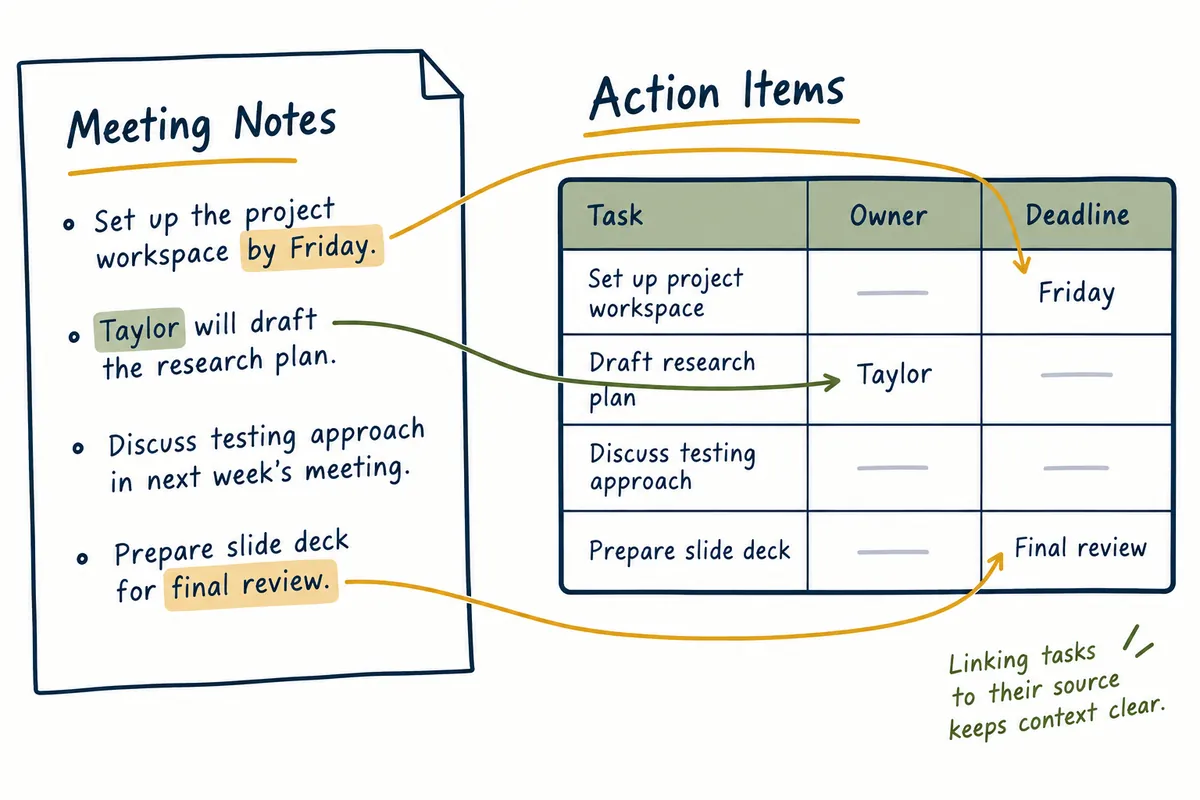
How to manage modified meeting minutes
If the person in charge or the schedule changes after sharing meeting minutes, record the date and details of the change rather than quietly overwriting the original record. What was decided in the meeting is different from what was changed afterward. For example, if the draft deadline was changed to September 11, you can indicate the history as “September 10 at the time of meeting, later adjusted to the 11 on September 9.” Ask the AI to reflect the latest conditions but separate the original decision from the modifications.
If confidential information or personal contacts are not needed in the result, omit them from the shared version. The scope of the internal original and the summary for external sharing may differ. This distinction is an important choice in document sharing, regardless of whether AI is used. You can request that “for external sharing, include only approved schedules and general procedures, and do not include internal names or content under review.” Double-check the recipient and the scope of the content before actually sending the file to be shared.
Handling when original text is insufficient
If a memo only states “Complete before the next meeting” without a date for the next meeting, the deadline cannot be calculated. In this case, instead of having the AI estimate the calendar, ask it to identify the necessary questions. Summarizing the questions briefly—such as “When is the next meeting?”, “Does ‘complete’ mean drafting or final approval?”, and “Who is responsible?”—makes actual verification easier. This list of questions is a starting point for filling in the missing facts, not a finalized work plan.
If a name appears in multiple forms in the transcription, we verify if it refers to the same person before converting it to a single form. "Minho" and "Mino" could refer to the same attendee, but they could also be different names. If confirmation cannot be made based on context alone, we mark the entry and compare it with the original text or the list of attendees. Rather than having the AI confirm important decisions on your behalf, it is safer to request that the AI show the scope of verification within the original text to ensure the results are used securely.
Frequently Asked Questions
Isn't a one-paragraph summary sufficient for the meeting minutes?While this may be sufficient depending on the purpose of sharing, if actual tasks are assigned, it is better to check the responsibilities and deadlines in a table. Placing a short summary alongside a detailed task table makes it easier for different readers to find the information they need.
If the original text is long, is it okay to send only a part of it?You may use only the necessary scope, but do not present it as if you have summarized the entire meeting. Mark the provided and missing sections, and check if decisions and follow-up tasks are in different sections.
If the AI indicates the basis, can I skip the verification?You must verify that the indicated grounds match the actual sentences and that proposals and decisions have not been confused. The indication of grounds is a tool that indicates where to review. A meeting minute becomes usable for business only after accurate comparison with the original text and preservation of undecided items are completed.
Official Data and Writing Standards
This is an informational manuscript created using AI. The official documentation was verified on October 3, 2026, and the examples below are structured for illustrative purposes. They do not represent actual performance results or measured values of personal projects. Please reconfirm updated product information before publication.
Organizing meeting minutes with Claude
1. Check original document status
→
2. Classification of Reporting, Proposal, and Decision
→
3. Create Assignment and Deadline Table
→
4. Comparison with Original Sources
→
5. Preserve Undetermined Items
This is a custom-made flowchart for illustrative purposes and is not an actual product screen or measurement result.
Original illustrations created to help explain this article.
Original on Tistory ↗