Reviewing Codex changes: Checking diffs and execution results together
This article was translated from its source language with AI assistance. Please check technical terms and equations against the original.
When the Codex fixes a feature and notifies you that the fix is complete, the first thing to look at is the actual file differences. While the summary of results helps understand the purpose of the changes, you must verify what was added and removed using the diff. It is easier to accept the results when you read together how many files were changed, whether code unrelated to the original issue was modified, and what scope the verified tests cover. This article focuses on the verification order at the moment of accepting the actual changes, rather than the general request to submit a code review.
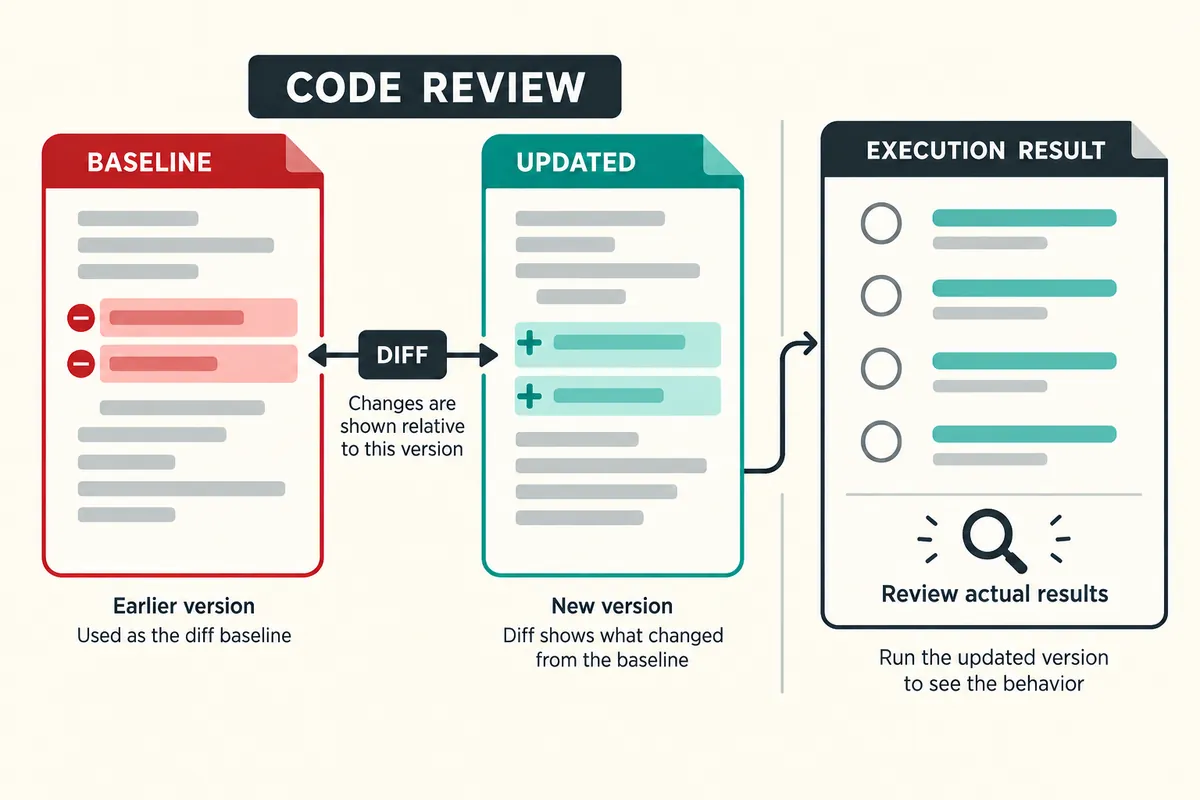
First, check what the comparison target is.
A diff is the difference between two states. You can compare the working folder and the staging area, or compare two commits or branches. Even on the same “View Changes” screen, the files displayed will differ if the reference point changes. OpenAI’s official review guidelines explain that the review screen reflects the current change state of the repository and may include changes outside of the Codex. Therefore, do not assume that all files displayed on the screen are the result of the current AI operation. You must first read which reference state is being compared to the current state.
If you are using a terminal, you can divide the scope using Git's read-only commands. For illustrative purposes, `git diff` is used to check changes that are not yet staged, and `git diff --staged` is used to check staged changes. `git diff HEAD` can be used to view tracked changes in the working folder relative to the last commit. The commands in this article are examples illustrating the verification method, not results obtained from running them in a personal repository. Please also remember that newly created untracked files must have their status list checked separately.
Compare with expected range in file list
Let's assume the task for explanation is "fixing option saving errors in the settings screen." It is natural for the settings screen, save functions, and related tests to change. On the other hand, if login permission settings, the entire style file, and even the package version have changed, you must verify the reason for the changes. The inclusion of unrelated files does not necessarily mean something is wrong. Common functions may have been modified to resolve the original issue. However, you must be able to explain the relationships to define the scope of the review.
Request that the purpose of the changes be written down rather than judging the role solely by the file name. You can write, “Classify each change file into changes directly necessary for troubleshooting, changes for verification, and other changes, and explain the reason.” When there is a lot of simple formatting, lines that actually change behavior can be buried. Verifying that functional modifications and formatting changes can be separated makes subsequent reviews easier. Files that the user has already modified should have their purpose read and be compared against the current results.
| Changes to check | Questions to read | Required verification |
| Modify conditional statement | Which inputs does the new condition process differently | Compare normal, empty, and boundary inputs |
| Change function name | Has the other file calling changed as well? | Call point and build verification |
| Change default value | Does it affect existing user settings? | Compare saved data and new data |
| package change | Is this a necessary change for this modification? | Check Compatibility, Installation, and Lock Files |
| added test | Does it actually reproduce the original error? | Check failure before modification and result after modification |
Read the red and green lines together
It is difficult to tell if previously guaranteed behavior has disappeared by looking only at the added code. You must read the role of the deleted line and how the new line takes over that role. The context lines in diff show the surrounding code that has not changed. If the context is insufficient, open and read the original file and the entire function. Even if a conditional statement is changed by just one line, a value may be converted before it or exception handling may occur after it. The number of changed lines does not substitute for the scope of influence.
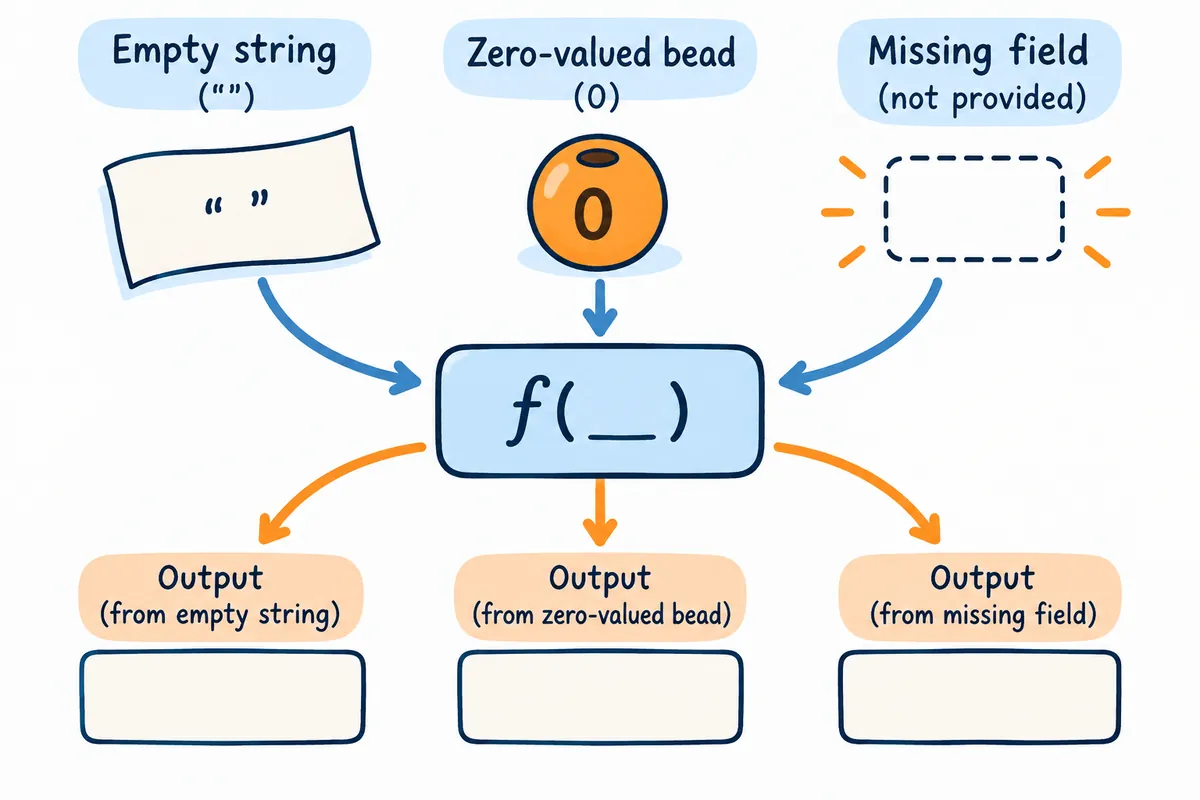
For example, let's assume that in a hypothetical JavaScript code, `if (!value)` is used to handle default values when there is no value. This condition can treat `false` or `0` as default values. If this is changed to a condition that checks only for `null` and `undefined`, `false` and `0` are preserved. Whether this change is good depends on the actual requirements. If the user can select `false`, which means "off," preservation might be necessary; however, if an empty string must also be treated as a non-existent value, additional conditions need to be discussed. We do not judge something to be correct simply because the code has become shorter.
Create Before and After Result Tables by Input
When reviewing changed conditions, it is better to separate different inputs rather than entering a single valid value. In the hypothetical option storage code, define what true, false, 0, an empty string, null, and undefined represent. This table is an example illustrating the review method, not the values used in the actual product. You must first define the meaning of the values to determine which result—the previous code or the new code—meets the requirements. If the data types are different, the same screen value may pass different conditions.
| Example Input | Example of business meaning | Conditions to review |
| false | User disables feature | Whether to preserve without overwriting with the default |
| 0 | Minimum allowed quantity | distinguishing from non-existent values |
| empty string | User clears value | Whether empty values are allowed is defined |
| null | explicitly no value | Whether the default value or error handling is correct |
| undefined | field not provided | Whether it matches the policy for missing fields |
Read the range of test pass
When you see a statement indicating that all tests passed, verify which tests were executed and under what conditions. If the installation phase failed and the test did not start, this must be distinguished from a test failure. There is also a difference between a state where only relevant unit tests passed and a state where the entire app was verified on a real screen. Request that the verification results be broken down into execution commands, test targets, successes and failures, and items that could not be executed. Also, check the time of the test to ensure that outdated results are not accepted as results from the last modification.
It is also helpful to check if the new test is merely repeating the current implementation of the code. If incorrect behavior is written as the expected value, the original problem will not be resolved even if the test passes. In the case of an explanatory save error, you should verify based on the results displayed to the user whether “false remains even after turning off the option and rereading.” If you can confirm that the same case fails in the code before the modification, the basis for the regression becomes clearer. However, if the state before the modification was not actually executed, such results are not generated and included in the report.
Write specific follow-up request
Instead of simply stating that you are dissatisfied with the overall result, write down the lines you checked and their impact. You can write it like this: “The empty string policy in the condition for reading option values has not yet been explained. Check the current input definition and clean up only the empty string handling while maintaining the intention to preserve false and 0. Do not change the login or package version. Please return the relevant input table and validation results.” This request narrows down the remaining judgments instead of broadly entrusting the new feature.
Please also request that the Codex review results distinguish between estimations and actual reproductions. For criticisms stating "possible," you must verify if there are reachable conditions. If you can describe the input and call path that are actually problematic, it becomes easier to determine the fix. Conversely, criticisms that differ only in code style preferences can be separated from the current error resolution. Once the review is complete, reread the diff of the subsequent fix and ensure that no changes unrelated to the original problem have been added.
If the binary/generated file has changed
It is difficult to fully verify the contents of binary files, such as images or documents, using only text diffs. You must open the actual file to check if the size, layout, and content have changed as intended. For locked files or automatically generated files, you must examine both the source settings and the generation process. You should not ignore everything simply because there are many changed lines, nor should you judge everything as dangerous just because there are many lines. Connecting the changes to which commands or source settings they originated helps to organize the subjects for review.
You must also check for file renaming or moving. Even if a file with the same content has been moved, relative paths or import paths may be affected. Check whether documentation links, test paths, and deployment settings refer to the old location. You can request the AI to “explain file moves separately from content changes and verify where the previous path is referenced.” If the behavior after the move has not been verified, do not write that it is complete simply because the file exists.
Final check before accepting the results
Finally, verify that the reproduction of the original problem has been eliminated, that the behavior to be maintained remains, and that the actual change files match the result summary. Also, read through any items that have not been verified before moving on to the next step, such as committing or deploying. Recording “Review Complete” does not guarantee that all possible defects are gone, but rather indicates that the results within a defined range have been verified. The diff, input case, and execution result must be interconnected in the decision to accept code changes.
What should I do if the diff is too long?Summarize the purpose of each file and read from the part that actually changes the behavior. If necessary, request that formatting changes be separated.Is it enough to just show the changes made by AI?Since user changes and common code work together, you must also check the current repository status.If the test passes but the screen is different, what do you see?Compare the settings, data, and build of the tested environment with the actual screen to see if they match, then add the missing reproduction conditions.
Official Data and Writing Standards
This is an informational manuscript created using AI. The official documentation was verified on October 3, 2026, and the examples below are structured for illustrative purposes. They do not represent actual performance results or measured values of personal projects. Please reconfirm updated product information before publication.
Review Codex changes
1. Check comparison criteria
→
2. Summary of Purposes by File
→
3. Read deleted and added lines together
→
4. Check changes per input
→
5. Comparison of test results
This is a custom-made flowchart for illustrative purposes and is not an actual product screen or measurement result.
Original illustrations created to help explain this article.
Original on Tistory ↗