Defining Scope Before Assigning a Feature to Codex: Input, Output, and Completion Criteria
This article was translated from its source language with AI assistance. Please check technical terms and equations against the original.
Completion criteria for a Codex feature request
| STEP 1 | Define the user's action |
| STEP 2 | Decide input scope |
| STEP 3 | Decide output format |
| STEP 4 | Record change boundaries |
| STEP 5 | Validate normal, boundary, and failure cases |
This explanatory diagram organizes the reading sequence. It is not an actual program screen or measurement result.
Asking Codex “Add a download feature to my app” conveys the goal, but leaves open which data to download, in what format, and how much to change. More gaps can mean more revisions after seeing the result. Instead of automatically writing long instructions, defining input, output, and completion criteria concretely helps when assigning work.
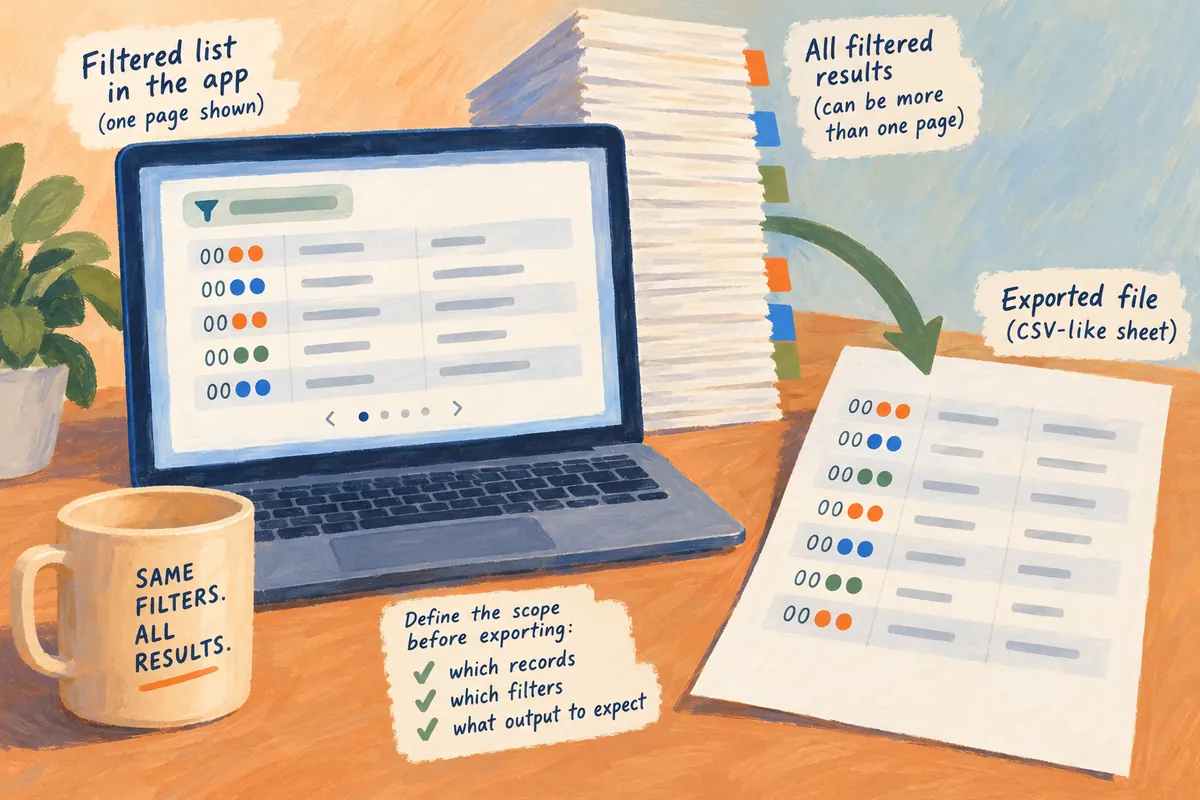
This article uses a hypothetical simple CSV export feature to explain how to organize request scope. It is not a record of modifying an actual project or running a program. Example file and screen names are illustrative and should be adapted to your code structure and requirements.
1. Express the goal through the user's action
Instead of “Implement export,” write “Allow users to download the current query results from the list screen as a CSV file.” Including who uses the result and what they do clarifies the implementation's purpose. Explain what the user needs to do before prescribing internal code structure, and add relevant files and existing behavior if the structure is already established.
OpenAI's official prompting guidance explains providing goals, context, output, and boundaries as needed. For Codex requests, it advises including desired behavior, relevant code or reproduction steps, important constraints, and validation methods. This article's request format applies those principles to a CSV example. It is not a mandatory formula requiring fixed incantations or special keywords.
Add one sentence explaining why the feature is needed. For example, “Operations staff want to review query results in another spreadsheet” reveals why column names and date formats matter. However, giving only the reason without the output format leaves no review criteria. Define purpose and actual output conditions together.
2. Define input scope first
Decide whether CSV input means all data, current filtered results, or one visible page. These produce substantially different results. State what users consider “query results” and whether sorting and filtering must be reflected. Avoid leaving Codex to guess whether a screen showing 20 items should download 1,000.
Suppose the hypothetical requirement is “All results matching the currently selected search conditions, preserving current sort order.” If data is loaded page by page, copying only the screen's array may be insufficient. Since related data requests and pagination also need investigation, you can ask Codex to inspect the existing query route and propose a change scope.
Specify input exceptions too. For empty results, decide whether to create an empty file, create only headers, or show a message. If only selected items are exported, define behavior when none are selected. Writing these conditions in advance reduces later questions about what happens in those cases.
| Requirement | Hypothetical example | Problem if unclear |
| Target data | All results matching filters | Confusing one page with all results |
| Order | Preserve the selected sort order | Different order between screen and file |
| Columns | Name, status, and creation date | Including unnecessary internal identifiers |
| Empty results | Show a message and create no file | An empty file appears to be an error |
| Timing | Query conditions at the time of the export request | Mixing results while filters change |
3. Define output at a level readers can verify
Define the output file name, character encoding, column names and order, date format, and representation of missing values. CSV values can contain commas, quotation marks, and line breaks, so do not assume simple string concatenation saves every value correctly. Specifying which program will open the file provides a compatibility criterion.
Hypothetical output conditions can say “Korean column names in the first row, dates as YYYY-MM-DD, missing values blank, and preservation of values containing commas, quotation marks, and line breaks.” These are verifiable conditions. Unless a particular library is required, it is reasonable to let Codex investigate existing project conventions and dependency policy before selecting an implementation.
Treat identifiers that look numeric carefully. Specify requirements so a code such as “0012” does not lose its leading zeros through numerical conversion. Automatic interpretation by the program opening the CSV can also affect the result, so distinguish the file's original strings from what the program displays. Decide the necessary identifier-preservation method according to the program and format used.
4. Record what to change and what to preserve separately
Limit changes to parts needed for the feature, such as the related screen, data processing, and export function. Specify what must remain, including existing query behavior, the overall screen layout, other file formats, and access permissions. Saying only “preserve existing features” may not sufficiently communicate which behaviors matter.
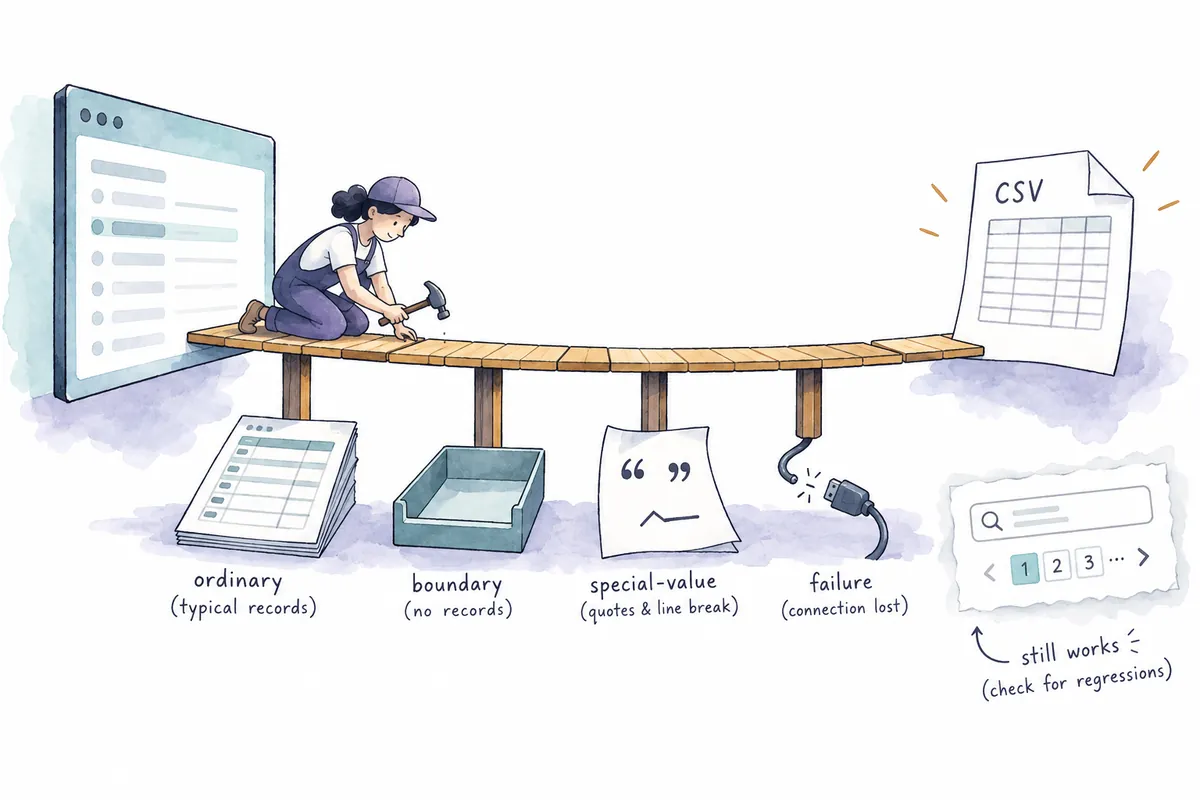
A hypothetical request saying “Preserve search, sorting, and pagination in the list; add only the CSV button and necessary export handling” provides review criteria. If server changes affecting performance or permissions are required, ask Codex to explain their reason and scope. Existing files and satisfaction of existing requirements are different things, so actual code context needs investigation.
For a collaborative project, identify files already being edited and ownership boundaries. Ask Codex to check current work and modify only what is needed so that it does not revert other people's changes. Assigning one feature does not require unrelated cleanup, wholesale formatting, or dependency updates at the same time.
5. Divide completion criteria into normal, boundary, and failure cases
Normal cases are inputs expected to be handled as intended. Boundary cases approach the limits of the scope, such as empty results, one item, large result sets, or values with special characters. Failure cases include data request or file generation failures. Choosing conditions that can actually break the user's feature matters more than writing many tests.
For the CSV example, check that file rows match filtered results, names containing commas and line breaks are preserved, empty results trigger the defined message, and existing list search still works. These four conditions can be checked visually or through relevant tests. A test file's existence alone does not show that all conditions were verified.
Also check whether execution is possible in the environment. Ask Codex to identify test commands and required dependencies and report the commands actually run and their results. Validation prevented by environmental limits must be marked unexecuted. Separating code-reading inferences, executed tests, and checks in the actual UI clarifies the result's scope of confidence.
| Validation type | Hypothetical input | Completion judgment |
| Normal | Several ordinary text items | Columns and rows match requirements |
| Boundary | Empty results and one item | Predefined message and output |
| Special values | Commas, quotation marks, line breaks, and leading zeros | No lost values or unintended row splitting |
| Failure | Query request fails | Clear status message instead of a misleading file |
| Regression | Existing search, sorting, and pagination | Check that original behavior remains |
6. A request example you can adapt immediately
An illustrative request is: “Add CSV export to the list screen. Export all results of the current filter in current sort order. Columns are name, status, and creation date; show only a message for empty results. Preserve values containing commas, quotation marks, and line breaks and identifiers' leading zeros. Keep existing search and pagination. Inspect related code first, make necessary changes and validate them, then report what was actually verified.”
In a real project, add related screens or file paths, the data structure used, and established test commands. You do not need to invent paths you do not know. You can assign investigation with “Find the related routes, explain the structure, and then make the changes.” A brief report of reasons for changes, key files, validation results, and remaining limitations makes review easier.
If new conditions arise after your request, indicate whether earlier conditions continue to apply. Adding “Include the date in the file name” does not replace the earlier column, empty-result, or special-value preservation requirements. Conversely, when changing requirements, explicitly state which condition is discarded. As small revisions accumulate, keep the final criteria together in one place.
7. What to check when receiving the result
Check whether the change explanation connects to the requested behavior. If the implementation claims to export all data, examine whether it processes results beyond one page and where it preserves sorting conditions. You do not need to understand every internal detail, but each requirement should connect to a verification location and result.
Comparing important examples before and after under the same conditions helps. Open a hypothetical CSV, check row count and column order, and inspect special values. When validating with real data, choose material that will not place confidential information in test files. After review, distinguish satisfied and remaining completion criteria to decide the next revision.
A good request is not a competition to write long sentences. Connecting input scope, output form, preserved behavior, and verification cases makes it easier to assign work and review results. The key is to define the reader's needed outcome concretely while leaving Codex room to investigate the actual project.
Official sources and scope of verification
Sources checked: October 5, 2026. Written by AI after reviewing official materials. Hypothetical cases and calculation examples in the text are not actual user records or experimental results. Service conditions, menus, and published materials can change; check the necessary conditions in current official guidance.
Original illustrations created to help explain this article.
Original on Tistory ↗